Wednesday, June 1, 2016

The three Us of mobile design: UX v usability v UI

Mobile design focuses, or should focus, on the user. This so-called user-centric design has generated a healthy obsession with the three Us: user experience (UX), usability and user interface (UI).


These terms, and the roles associated with them, are commonly mistaken and/or used interchangeably. This is not entirely unsurprising as there are no ubiquitous definitions and some overlap.


A useful way to approach this is to identify your typical mobile user and what they want to achieve from your service, then ask:


  1. Did they achieve this goal? How easily/quickly? = Usability.

  2. Did they find using the service rewarding? = UX.

  3. How do they physically interact with the device? = UI.


Robert Gaines, a Kansas, US-based web and app developer suggests adding a fourth element visual design, which is a good idea, but it would throw an unhelpful V in with the Us.


I would also include visual design, which ensures that static visual components, including graphics and typography, are attractive. The four are distinguished as follows:


  • UX is about a user's overarching experience. It involves the analysis of how the user feels about both interfaces and processes, including sales funnels [the progression from prospect to customer].

  • Usability is about how easy it is to complete a task.

  • UI is about how a user interacts with a website.

  • Visual design is about the appearance of static visual elements, including graphics and typography.


The four fields overlap, but in summary: UX is about emotional response, usability is about ease of use, UI is about interaction, and visual design is about appearance.


Are there examples that combine great usability with user experience?


A website I recently took note of was AMC Theatres. Not only is this website attractive and easy to use, it exhibits a unique form of on-boarding that is unobtrusive yet ubiquitous.


The “My Movie” feature makes users feel engaged while also encouraging them to sign-up for an account and share their activities on social media. This pattern takes the on-boarding funnel, often detrimental to the user experience, and turns it on its head by converting it in to an experience that customers actually enjoy using.


amc_mymovie_cz21


There are lots of different analogies for UI/UX/usability/visual design, but none beats the car and driving analogy (adapted from Thomas Baekdal).


A Ford Focus or a Ferrari Testarossa will get you from A to B. So the usability is the similar. But the driving experience – UX – will be (you would hope) more thrilling in the Ferrari. The UI is the steering wheel, pedals, gear level etc. Visual design is the lines, dashboard, color (any color as long as it is Ferrari red).


Depending on the size of the project, these requirements could be serviced by a team of specialists, with variety of job titles, or they could be merged into one all-encompassing role. See this job spec for a superhero in charge of mobile UX and UI design and strategy for web and app at Verizon marketing.


ui_ux_designer_job_ad_cz21


User Interface


The UI, or graphical user interface (GUI) or human computer interface (HCI), as it is sometimes known, governs how the user interacts with the device and the website or application displayed thereon. This includes layout and horizontal or vertical orientation; menus, including the main navigational menu – often represented by the three line “hamburger” icon; navigational, link and action buttons; text fields and forms; radio buttons and checkboxes; touch and gestures.


For deeper insight into the layouts, input controls, menus and other aspects of UI, see the Android Developer Guidelines  and the iOS Human Interface Guidelines.


N.B. these guides are for native app developers, but there's plenty of cross over with web.


The UI designer will usually mockup the user interface for a mobile site or app using hand-drawn and digital wireframes.


Few designers or developers will use design mobile UI from scratch. Designers will use UX kits, see this collection from Speckyboy. Similarly, developers will use frameworks such as jQuery Mobile and Sencha Touch, which allows them to reuse tried and tested UI elements and layouts.


The art of the UI designer is to strike a balance between creating an experience that differentiates itself from the competition and creating a UI that is intuitive i.e. you don't have to think about how to use it.


There is a UI saying goes: A user interface is like a joke… If you have to explain it, it's not that good. It's unclear who said this first, but the design below is from London-based digital designer Kyle Robertson.


user_interface_joke_robertson_cz21


Ginny Keegan, senior business analyst for a large US retailer:


The UI is a critical component. It's like the foundation of a house. You must have a solid and strong foundation that will support the beams, flooring, walls and roof, without it your house will collapse.


It's the same thing in mobile development. You have to start with a solid foundation architecture, database structure, security, etc. that will support the overall user experience of the site. You cannot have one without the other.


Usability


Usability builds on the UI. It measures how well the interface works in practice – i.e. is it clear which buttons need to be tapped to proceed to the next screen? Is it easy to tap the appropriate button without unintentionally tapping the display ad next to it?


But usability is much more than this. It also considers how easy it is for the user to complete their goal. To evaluate this, it is essential to identify the actual goals of the users. This is why good mobile designers obsess about use cases, user stories, customer journeys and user journeys, and so should you.


Compared with UX, usability is more easily quantifiable.


Usability is affected by:


  • Fast v. slow page load times.

  • Intuitive v. confusing navigation.

  • Obvious, well-placed buttons v. unintuitive, ill-placed or non-working buttons.

  • Large well-spaced buttons or links that are easy to tap v. buttons are too small or close together to tap accurately.

  • Page fits screen, all important information and buttons are in view v. off screen to right or below fold.

  • Easy to read v. illegible text

  • Well-chosen and appropriately sized images v. irrelevant and oversized.

  • Tap-to-call/email/map v. static contact details.

  • Relevant, appropriately sized ads v. large, intrusive and/or irrelevant ads.


In the next blog we will consider how to conduct a usability test of your website. But as a taster…


The following example was highlighted at the Digital Shift conference in London, last month. One presenter complained that they started to view the UK's 100 winning startups on a mobile device, but received full-screen pop-up ads for each (he gave up after two pages).


The interesting thing when comparing the experience on tablet and smartphone, the 100 Startups using Mobilizer is that full screen ads only appear to be served to mobile devices – ads on the tablet are less intrusive.


100_startups_cz21


Must it be function v beauty?


Focusing on usability can encourage utilitarian design, i.e. minimalist, simplicity, functional and stripping out features that are simply there to enhance visual appeal and wow the audience. Though it has to be said that the best utilitarian mobile web or apps, like Scandinavian furniture, can be a thing of beauty and enjoyment.


Daniel Rowles, managing director, TargetInternet.com:


Usability is about task-based interactions and making those tasks easy to complete and intuitive. The User Experience is something broader and is the emotional connection that we have to carrying out those tasks. Was it meaningful and valuable, and was it a pleasurable experience?


Are there examples that combine great usability with user experience?


Uber is a good example due to the simplicity and effectiveness of the app design. It has a wow factor in its simplicity and it's very intuitive.


It should be noted, however, that taxi app Uber has not yet chosen to extend the great experience of its native app to the mobile web, where the web site is no more than an advertisement for its download app.


User experience


UX is the over-arching feeling that the user gains from interacting with the mobile site (or app). It is less tangible, more individual and therefore harder to design for and to test than usability.


Commonly, usability is considered to be a sub-category of UX.


One of the best visual representations of UX is the user experience honeycomb, created by Peter Morville, president, Semantic Studios. This was originally created for web product, but each of these criteria is equally or more applicable to mobile.


Consider how your website resonates with the users for each of the following:


  • Useful – will it become an essential utility that users can live without?

  • Usable – is it intuitive to use? Is it easy for user to complete their goals?

  • Desirable – when they hear about it from a friend, do they think: “I need that!”?

  • Findable – is it easy to find when conducting a web search for relevant terms (or app store search)? Is it easy to navigate, find what you need on the site?

  • Credible – is the call-to-action compelling? Will users trust the content onsite?

  • Accessible – is the site easy to use by people with disabilities; such as visually impaired person using a screen reader.

  • Valuable – will users pay, trade personal data, accept advertising in return for use?


honeycomb_morville_cz21


Ginny Keegan:


The user experience is important to define in your strategy because it is what the user will remember the most when they use your mobile site or app. The UX is more about the emotion and psychology of the user; it's about the feeling they get when they are browsing though and swiping from page to page.


In mobile development it is important that the user has a positive, easy and enjoyable feeling when using your product. You want them to feel a joyful emotion or happy experience and a stress free and no struggle experience.


Useful resources:


This is Part 21 of the ClickZ 'DNA of mobile-friendly web' series.


Here are the recent ones:


Tuesday, May 31, 2016

Does Google look at anchor text in internal links?

Internal linking is a key SEO tactic, one which allows websites to send clear signals to Google on the relative importance of various pages.


It also works from a user experience perspective, helping visitors find pages that are relevant or potentially useful to them.


It's something I place great importance on as an editor, as it's one part of SEO that I can control, and I've seen the benefits for sites I've worked on.


Internal linking: examples


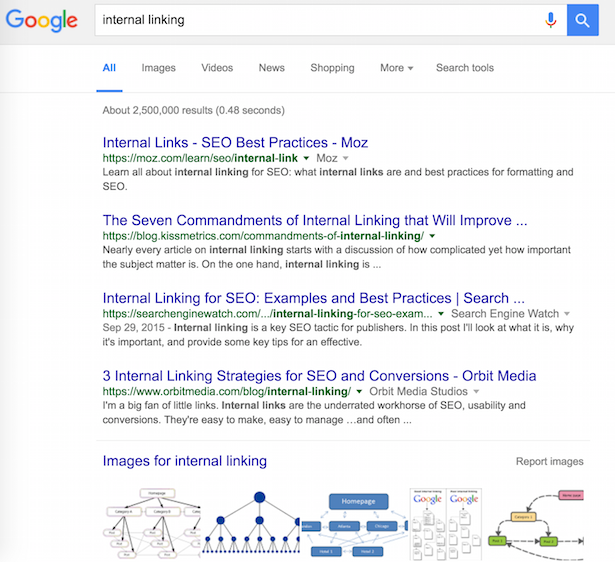
Let's take an example from Search Engine Watch. I wrote this article on internal linking, with examples and tips, back in September 2015.


I've since linked to it using that exact anchor text (and variations on it) on at least 10 occasions. Essentially, I'm telling Google that this is the page I want Search Engine Watch to rank for that term.


As we can see, it's worked well. Third on Google, and first for related terms (internal linking best practice for example).


Internal linking SE


Then there's Mail Online. The most visited English language newspaper on the web had a relatively haphazard approach to internal linking until recently.


For common, high traffic terms (world leader's names, celebrities etc) would be used regularly in articles.


The result was that each article would end up competing against previous articles for the same keyword or phrase.


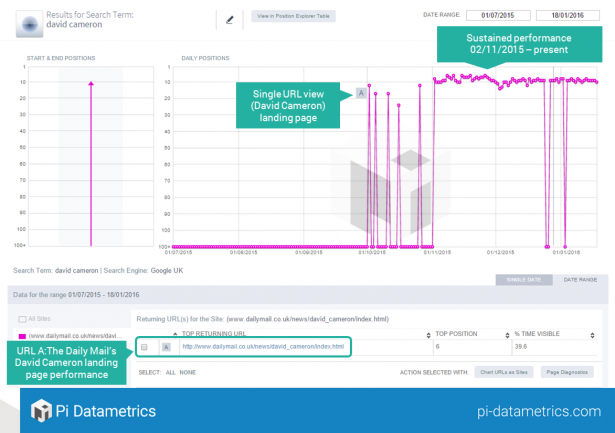
The chart below shows its rankings for 'David Cameron' over a six month period. 80 different URLs were returned from the Mail for that search, but it didn't rank consisitently for the term.


1.-Entire-Daily-Mail-view-for-the-search-term-David-Cameron-e1453731668448


The answer was a consistent internal linking and hub page strategy. Mail Online created hub pages for common terms and consistently linked to them.


The result is a more consistent ranking from November 2015 onwards, when the changes were implemented.


There have been some fluctuations, perhaps due to inconsistent implementation of the linking strategy, but the page is performing much more effectively. As a result, the site will pick up more traffic for that term. Applied across the whole site, this can make a big difference.


nov 2015


Does Google count anchor text in internal links?


This is the question Shaun Anderson from Hobo Web sought to answer recently.


In the examples above, the pages targeted with internal links all contain the keywords used in the anchor text. So, Google could be using the content of the page, and the fact that several pages link to it to decide on the ranking.


In other words, this doesn't prove that Google is taking note of the anchor text when choosing to rank a particular page.


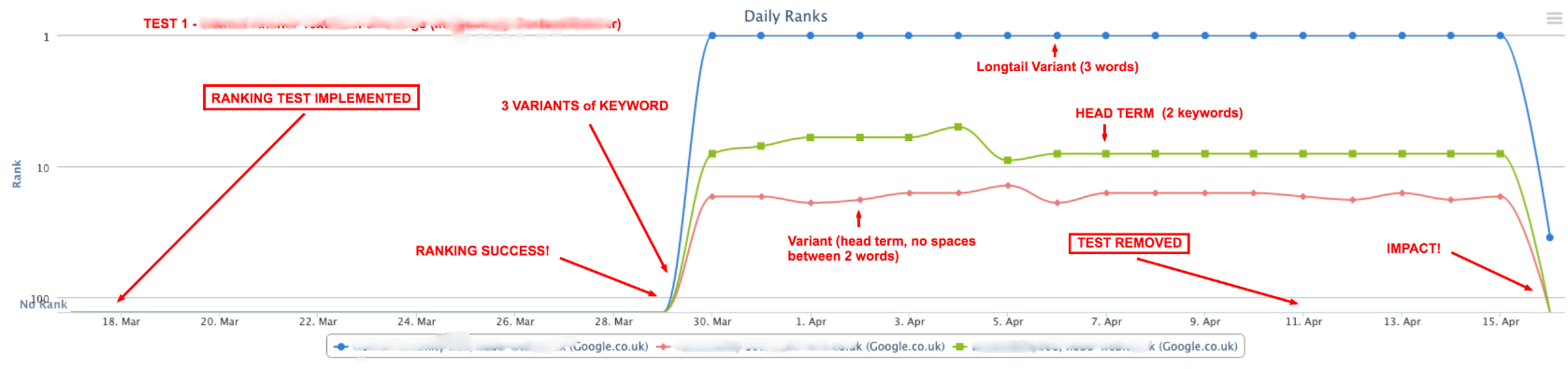
So, Shaun set up a test. He added an internal link to one page on his site using the target keyword as anchor text.


It's important to note that the target page did not contain the keyword used, so the only signal that it was relevant to said keyword was the anchor text on the link.


As we can see from the chart, a number of days after the test was implemented, the page ranked for the target term. When it was removed, the page dropped again.


hobo web screenshot


As that page had no other relevance to the term other than the link, the anchor text appears to be the only reason for the page's ranking.


It's worth reading Shaun's blog post for more detail, and for further variations on the test, but the indications are that the answer to the question in the headline here is yes.


It would be good to see other tests to back up this with more evidence. In fact, I'll see if I can devise one on this site along similar lines.

Friday, May 27, 2016

Five most interesting search marketing news stories of the week

Welcome to our weekly round-up of all the latest news and research from around the world of search marketing and beyond.


This week we have a round of very exciting changes to AdWords and some stats about the intolerability of video ad formats.


Google AdWords launches new features for mobile ads and maps


As Sophie Loras reported last week, Google has “introduced new tools and features to AdWords to specifically address the consumer shift towards mobile.”


These include:


Expanded text ads for a mobile


Headlines in AdWords will increase from one 25-character header, to two 30-character headers, giving advertisers more room to explain their products and services.


The description line will also increase from two 35-character description lines to one 80-character description line.


Responsive display ads


These are designed to help advertisers with the many different content shapes and sizes across the more than two million publisher sites and apps on the Google Display Network (GDN).


Bid adjustments for device types


AdWords will soon allow advertisers to set individual bid adjustments for each device type (mobile, desktop and tablet).


Connect online and offline with mobile


Google is introducing new local search ads across Google.com and Google Maps to reach consumers as they search for physical business locations.


New ad formats on Google Maps


To make it easier for users to find businesses around them Google Maps will offer promoted pins as well the ability to include details for one off special offers or sales.


You can now tie-up all your web properties together in Search Console


As I reported a few days ago, you can now track the combined search visibility of all your managed web properties.


So all the separate platforms you operate for one single brand – websites, mobile sites, apps – you'll be able to treat as a single entity. You can even add HTTP or HTTPS versions of the same site and combine multiple apps.


The aggregated data from your properties will be found in the Search Analytics of Search Console and you'll be able to check everything from clicks, to impressions to CTR, as you would normally with single properties.


Silent ads for the win


Latest research from Wibbitz on the state of video advertising reveal some fascinating – if not obvious – home truths on our tolerance for video ad formats.


45% of people said that muted ads are more tolerable than targeted, autoplay or interactive ad formats.


Also, the survey found that 70% of people won't watch an ad longer than 10 seconds, 61% admit they always skip video ads and 42% disapprove of autoplay ads.


Bing's share of the search market is growing faster than Google's


According to comScore, in April 2016, Bing's share of the search market rose by 0.2% while Google's dropped by 0.2%.


Also according to SEJ, “Google's total share of the US desktop search market has dipped below its previous 64% to 63.8%. Microsoft's share of desktop search is now sitting at 21.6%.”


Google's new title and description lengths: 'it's just a test'


Google has been experimenting with a variety of expanded title tag and meta description lengths in its SERPs over the last few weeks.


However, as we all expected, Google's John Muller has this to say about Google's constant honing of the look of its search results…


So yeah, don't get too excited.

Five competitive advertising strategies to outsmart your competition

It's often said that competition is good for your business. It pushes you to be your best. Think Coca-Cola vs. Pepsi, Visa vs. MasterCard, Xbox vs. PlayStation, or Apple vs. Microsoft.


Of course, part of the fun of rivalry is stealing customers from your rivals. You can do that with the help of advertising!


Today you'll learn five brilliant competitive advertising strategies you can use to get in front of your competitors' customers and (with a little work) turn them into YOUR customers instead. *Evil laughter*


competitive-ads-dr-evil-laugh


1. Target Facebook users whose interests include your competitors


Facebook Ads doesn't offer keyword targeting for your ads and you can't specifically target people who have liked your competitors' pages. However, Facebook offers something called interest-based targeting.


On Facebook, interests range from extremely broad (e.g., business or entrepreneurship) to very specific. In this case, your competitor's name is the specific interest you want to target, because Facebook allows you to choose to target people based on, among other things, brands and products they like.


facebook-interest-targeting-competitive-ads


Type in your competitor's website URL. Or, if that doesn't work, you can type in your competitor's brand name or try a few keyword combinations to figure out best option for reaching their target audience – which is now your target audience!


2. Disrupt your competitors' videos with YouTube ads


Recently I was on YouTube searching for an AT&T ad. Before I could watch the ad I was looking for, I had to sit through another ad – I know, that's modern life. But the genius part was that this ad wasn't for AT&T, but for its competitor, Sprint.


In this ad Sprint explained why it is a better provider than AT&T and highlighted an offer to switch carriers, before I could even see the ad for the brand I had searched for.


To execute this competitive advertising strategy for your own campaigns, create the most watchable TrueView ad you can, adding in how much you're willing to spend.


There are many targeting options to choose from (e.g., demographics, interests, keywords, remarketing). But today we're feeling competitive!


You want to target your video ads so that whenever someone searches for the YouTube videos of your competitor that they'll see your ad first. If you play it right, they might not even watch your competitor's video!


3. Use your competitors' emails against them with Gmail Ads


Another brilliantly sneaky competitive advertising tactic you should start using now is targeting people who have recently shown interest in the things your competition sells.


With Gmail Ads (those ads that appear at the top of the Promotions tab of users' personal email accounts), you can do keyword targeting on your competitors' brand terms.


As you read this, people who are in the market for your competitor's products are getting emails from your competitors – and those emails mention your competitors' brand terms.


For example, if you were competing with Sephora, you could target its brand name as part of a Gmail ad campaign so that every time a Sephora newsletter arrives in someone's Gmail inbox, your brand ends up in its inbox as well. Obviously, your email should tell Sephora subscribers all about your great competing site and product and why they should check your out.


So if you want to try to steal some sales, target the trademarks of your competitors. Make sure you use an email subject line that will have users clicking your Gmail Ads in droves.


Use only the best-performing subject lines, the ones with the highest open rates – your unicorns. As an added bonus, because these people are already in the market for a competing solution, it's likely that more people will click on your ads, which reduces your costs.


gmail-ads-templates


4. Reach your competitors' audiences through the Google Display Network


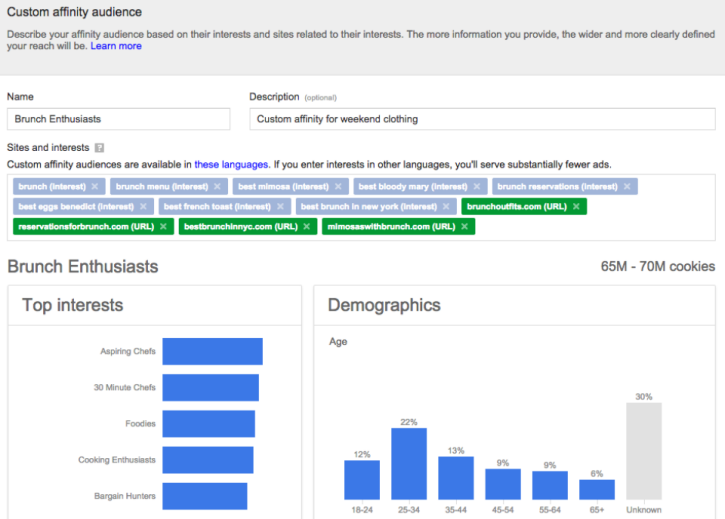
Google has some great display ad technology. But if you want to beat up on your competition, you need to use Google's custom affinity audience feature.


Affinity audiences let you target a predefined audience, one that should be more receptive to seeing your ads.


custom-affinity-audience-competitive-ads


To make this work brilliantly, and avoid wasting your ad budget, you'll want to target the home page of your competitor. AdWords will then figure out the brand trademarks and the behavior of the people who visit and are interested in that domain name (or search for content on related topics).


Let's use MailChimp as an example: MailChimp is a publication that's geared toward businesses doing email marketing. So if I'm running a similar business geared toward email marketers,MailChimp visitors would form the basis of our “ideal customer” we want to reach with our own display ads.


This will start the process of getting the right people familiar with your brand and the products or service you provide. And hopefully, with the right message, you'll start stealing business away from your competitors and experiencing breakout growth.


5. Download & target your competitors' Twitter followers


There are tools that allow you to download a list of every Twitter follower for any account, such as BirdSong Analytics. You can use these to download a list of all your competitor's Twitter followers. Costs generally start around $35 and go up the more followers the account has.


Once you have your report, you can use those Twitter handles to create a list that you'll then upload to Twitter Ads. Make sure to select the option to “add tailored audiences.” Uploading the list will take about 3 hours to process.


You can then create ads to get your business in front of the Twitter users who are already following your competitors and are likely in the market to buy or switch to a similar product or service. Genius, right?


After setting your budget comes the real fun. It's time to get creative and compose your tweet copy. Important note: Twitter's “advice” for ad success is kind of a disgrace, so please read my article on How to run a successful Twitter Lead generation campaign.


Don't let your competitors have all the fun!


Remember, all these competitive ad strategies are putting your business in front of users who are interested in your competitors, which means they're much more likely to be in the market for your product/service. You just have to show them that what you offer is better than what your competitors do!

Why ecommerce sites should use both SEM and SEO for acquisition

It is well-known that in order to get a good return on investment in terms of marketing, online retailers need to be constantly in front of their customers. However, with the rise of online users, it is important these retailers adopt a multichannel approach.


Despite being similar in that SEM and SEO both aim to improve visibility through rankings on search engines, they do have significant differences.


SEM is a pay-per-click (PPC) service, while SEO improves ranking organically and does not involve paying for search results.


However, with Adobe's recent Q4 Digital Advertising Report explaining that not only are CPCs in decline in Europe, but click-through rates are on the rise, all signs are pointing to a Paid Search orientated strategy.


Are retailers better off investing their money in SEM or their time in SEO? Let's explore the arguments for each technique.


Why should ecommerce retailers use SEM?


Quick results


With SEM, results can be achieved relatively quickly. Of course, you will be required to make changes in the AdWords interface, however once this has been done, you can see results almost instantly.


With SEO on the other hand, you will need to implement a longer-term strategy and it can take time to reap the rewards of your efforts.


Better conversion rates


According to New Media Campaigns, PPC holds a slight edge in conversion rates as paid search results are 1.5 times more likely to convert click-throughs from the search engine.


Direct control over your visibility


Even with a significant amount of time invested into SEO, there is no guarantee that you will ever appear in the top spots on search results pages. While the same can almost be said for PPC, bidding plays a huge role in paid search campaigns and increasing your budget can take you so far in improving your visibility on search engines.


Few website optimisations


Although good website structure helps to improve your PPC ranking, it is not incremental to do so to achieve good paid search results. SEO on the other hand, requires that your website's structure and content are optimised to achieve good results


Why use SEO as well as SEM?


While there are many arguments that may convince online retailers to rely on Paid Search, there are also many benefits to using SEO as well as SEM in their multi-channel strategies.


No direct additional costs


Besides your time and effort, SEO allows you to achieve results without any direct additional costs. SEM on the other hand, can obviously require a significant amount of investment, particularly for competitive keywords.


Organic results more likely to be clicked on


According to the same study by New Media Campaigns, organic results are 8.5 times more likely to be clicked on than paid search results!


Improve brand awareness


With organic results more likely to be clicked on, it is a no-brainer to invest in an SEO strategy. However, another added benefit is the possibility to improve brand awareness.


Presuming that you are able to successfully place your ads in paid search results, also appearing in organic results will help to reinforce your message and improve the visibility of your brand. Over time, the more your brand awareness increases, the more likely consumers are to trust your brand name.


A long-term strategy


It will take time and effort to properly optimise your website for search engines, but in the long term it will help bring you continuous website traffic for free.


Of course, you will need to be sure to keep up-to-date with the latest guidelines to ensure that you are not penalised and your efforts don't end up going down the drain.


As you can see, there are many advantages to both SEO and SEM, however what is important to take away is that they are complementary techniques. Online retailers are generally encouraged to start by adopting both strategies.


For newly-launched businesses, SEM will accelerate brand awareness, as users start to recognise and trust your brand name. As a first step, it is wise to invest more into SEM while your SEO efforts get off the ground. You can then balance your investments once your organic visibility increases.


Mark Haupt is UK Sales Director at Twenga Solutions and a contributor to Search Engine Watch.

Monday, May 23, 2016

State of video advertising report: what are the most tolerable ad formats?

As video content increases, it's time for brands to understand their consumers, in order to deliver the most relevant ads to them.


Wibbitz conducted a survey in March about video consumption and consumer sentiments regarding video advertising, hoping to help publishers and consumers reach a middle ground.


Every publisher looking to expand its services to video content needs to understand its audience first, hearing their needs, in order to deliver the best video experience to them.


Here are the most interesting findings from Wibbitz's report and what we can learn from them:


The changing state of video consumption


Video consumption has been increased during the past years and 26% of people who participated in Wibbitz's survey responded that they are watching at least one video per day.


Mobile devices have significantly contributed to the increased video consumption, as they make videos more accessible and this can be confirmed by the fact that 55% of the frequent video viewers prefer watching them on their smartphone.


As for the most popular social platform to watch videos, Facebook is a clear winner, as 54% of them picked it as their first social destination for video consumption, and this can also be justified by Facebook's decision to highlight video content on the users' news feed, while the launch of Canvas made video advertising even more appealing.


However, these stats may change during the next year, as I personally predict a rise of video consumption on Snapchat.


video12


Strong preference on silent ads


No matter how often people are watching online videos, they still don't like ads with sound, or irrelevant messages.


45% of people answered that muted ads are more tolerable, while 39% of them considered targeted ads a crucial factor for tolerable ads.


Brands start understanding how annoying the sound in advertising may be and that's why they are trying to send their message through the video, even with the addition of captions, to make sure they don't lose the viewers out of annoyance.


video3


The power of targeted ads


It is very important nowadays for brands to focus on targeted video ads, as users grow more impatient and less receptive to irrelevant advertising.


In fact, frequent video viewers care even more about the relevance of the ads, which means that it's important for brands to keep them happy.


Facebook and LinkedIn video viewers seem to be more demanding, with 41% and 47% of them respectively preferring targeted ads from any other ad type.


Short ads


The rise of the demanding video viewers, who also tend to have a short attention span, creates the need for shorter video ads to keep them engaged, as 70% of people won't watch an ad longer than 10 seconds.


As the length of the video increases, only 51% of people will watch up to 10 seconds, but there is an increased chance they'll watch up to 30 seconds in such cases.


Thus, the duration of the video along with its relevance, affect users' watch time and the engagement can only be achieved with great content that will convince viewers to keep watching for more than 30 seconds.


video4


Skipping ads


It is becoming common for consumers to seek for ways to skip an ad, especially if it's annoying or irrelevant, with 61% of them admitting that they always skip video ads, if possible.


However, it has also been observed that not everyone takes a real action regarding ad skipping, while half of the respondents are more likely to appreciate a mute ad.


This is another reminder for brands to use the sound in advertising appropriately, only to enhance the viewing experience and not to make users skip the video faster.video5


Autoplay


Autoplay in video advertising can be annoying and 42% of the respondents share the same opinion, but mobile video consumption may change this soon.


It seems that mobile users are more receptive to autoplay ads and this could be related to the highly targeted content they're exposed to. However, Snapchat users don't seem to agree, as 55% of them find autoplay ads intrusive.


Apparently the opinions are still divided about autoplay in video advertising, which brings a great opportunity for brands to turn around the unhappy users with non-intrusive content that is highly relevant to their audience.


video6


What brands can learn


All the above observations can help a brand understand what video consumers want,  in order to produce the right content for them.


Here are the key points to remember:


  • Relevance is key. Video consumers expect highly targeted advertising that fits their interests and their browsing habits. This increases the chances for them to keep watching a video. A personalised experience is always appreciated, so there's no need to create video ads without knowing your audience first.

  • Silent ads can increase the engagement, as you can still send your message effectively without any disruptive sound. If there's an indication that your audience hates the sound in your video ads, then it's time to focus on the visual side of advertising.

  • Focus on mobile. Video consumers on mobile devices have been increased, which means that you should make sure that your content is optimised for mobile, making the viewing experience pleasant.

  • Keep it short. Even if you create a longer video, make sure that the first seconds are appealing to help users stay engaged.


Friday, May 20, 2016

Searching for Video, Images, Audio, Gifs, Podcasts, Memes & Radio: a directory of search engines, finders & generators

Here's an up-to-date list of all the available video or video file search engines, audio and sound search engines, podcast directories, meme generators & Gif finders at your disposal.


Jump to a section:


Images – Gifs – Memes – Video – Radio Stations – Sounds – Podcasts


Images


Bing


http://www.bing.com/images?FORM=Z9LH1


Bing offers an image search engine that uses trending searches from across the web to create this stream of image results. It even allows you to personalise your stream when signing in.


Everystockphoto


http://www.everystockphoto.com/


This is a search engine for free photos, indicating the license for each one, helping users find the exact image they're looking for and the license it's associated with.


Flickr Creative Commons


https://www.flickr.com/creativecommons/


Flickr is an awesome resource for photos, and you can use any that are labelled with a Creative Commons licence.


Freeimages


http://www.freeimages.com/


Browse 388,444 photos and illustrations and find the one you're looking for.


Getty Images


http://www.gettyimages.co.uk/  


If you're looking for creative and editorial photography of high quality, then Getty Images is the right resource for you. You can buy any image either with credits, or a subscription plan.


Google Images


http://images.google.com


Find images from across the web, as discovered by Google's crawler-technology.


Imgur


http://imgur.com/


The most popular images on the web, ranked by popularity.


Ixquick


https://eu.ixquick.com/


Startpage by Ixquick blends Google search results with privacy, promising more convenience and maximum privacy protection.


Pexels


https://www.pexels.com


Large database of free photos for personal and commercial use.


Picsearch


http://www.picsearch.com/


An image search service with more than 3,000,000,000 pictures.


Pinterest


https://www.pinterest.com/


Pinterest may not be your first choice when looking for an image, but it turned out into a powerful search engine for images.


Pixabay


https://pixabay.com/


Over 640,000 free stock photos, vectors and art illustrations.


Unsplash


https://unsplash.com/


Free high-resolution photos focusing mostly on nature and lifestyle photography, only requiring a credit and link to the photographer.


Wikimedia Commons


https://commons.wikimedia.org/wiki/Main_Page


An database of 31,590,351 freely usable media files.


Yahoo Image Search


https://uk.images.search.yahoo.com/


Search or browse to find pictures on the web. Flickr users can now find their own images through Yahoo's image search.


Yippy


http://new.yippy.com/about-yippy-search


Yippy, previously known as Clusty, queries several top search engines to  combine the results  and generates them in an ordered list based on comparative ranking.


Gifs


GifMe


https://gifme.io/search


GifMe search is powered by users collecting and tagging over 804,886 Gifs.


Giphy


Giphy is the largest online database and search engine for Gifs and it's the most popular choice for many users when looking for a Gif to support their content.


Imgur


http://imgur.com/r/gifs


Find the best Gifs ranked by popularity.


Memebase – Cheeseburger


http://memebase.cheezburger.com/senorgif?ref=subnav


Find the Gif you're looking for or browse the feed to discover new ones.


Twitter


https://twitter.com


Twitter collaborated with Giphy to embed its search engine when creating new tweets and this helped users have access to a huge Gif library with just one click.


Tumblr


https://www.tumblr.com


Tumblr allows its users to search for all the available Gifs when creating a post, making their use even more convenient.


Memes


Animal Advisor


http://animaladvisor.net/


A meme search engine containing “947,359 dank memes.”


Frinkiac


https://frinkiac.com/


3 million screencaps taken from The Simpsons to help you find the right meme for every occasion.


Imgur


http://imgur.com/memegen


Find the most popular memes of the web and customise them accordingly by changing the text.


MemeCenter


http://www.memecenter.com/


Find every meme you've ever wanted.


Video


AOL On


http://on.aol.com/


AOL On is a video search platform that provides reports of all the latest news in the form of short videos, helping you to catch up with the trending topics.


Bing


http://www.bing.com/?scope=video&nr=1&FORM=NOFORM


Bing allows you to find the videos you're looking for across the web and it displays the results in thumbnails. What's more, it also offers search suggestions and relative results to help your searching.


Blinkx


http://www.blinkx.com/


Blinkx is offering high-quality, personalised, curated video content and it numbers more than 35 million hours of online video.


Clipblast


http://www.clipblast.com/


Find trending videos in a large video search engine index with an easy interface.


Dailymotion


http://www.dailymotion.com/gb


A popular choice for video searching, attracting 300 million users from around the world who watch 3.5 billion videos monthly.


Google videos


https://www.google.com/videohp?hl=en


Google's video search may be an alternative to Youtube, as they don't seem to provide the same results for each query, helping users find what they're looking for without leaving the search platform.


Metacafe


http://www.metacafe.com/


A large video database that specialises in short-form video entertainment.


Moving Image Archive


https://archive.org/details/movies


A large collection of free movies, films and videos.


Vevo


http://www.vevo.com/


Vevo is a music video search engine that hopes to help you find exactly what you're looking for and it numbers more than 12 billion monthly views. http://www.digitaltrends.com/movies/vevo-acquires-showyou-subscriptions/


Yahoo


https://video.search.yahoo.com/


Yahoo's video search allows you to search for videos across the web, with its interface being familiar and functional.


Yandex


https://www.yandex.com/video/


Yandex is another video search engine that helps you find the video you're looking for by organising the most popular videos depending on their category.


YouTube


http://www.youtube.com


The most popular video search engine is probably your first choice when looking for any kind of video, and that's why it ranks as the second most visited site on the web. http://www.alexa.com/siteinfo/youtube.com


Radio Stations


Internet-Radio


https://www.internet-radio.com/


Internet-Radio offers more than 46,462 radio stations to discover the one that suits your music tastes.


PublicRadioFan.Com


http://www.publicradiofan.com/


A customizable web site that provides one-click access to public radio programming from around the world.


Radio-Locator


http://www.radio-locator.com/


A searchable database of over 15,000 radio station web pages and 10,000 audio streams.


Radio Tuna


http://radiotuna.com


Radio Tuna is considered the first real-time search engine for online radio and it profiles radio stations by the actual music they're playing, organising the best music from every genre.


Shoutcast


https://www.shoutcast.com/Search


Shoutcast is an online directory of radio stations with over 50,000 music, talk, sports and community radio stations from all over the world.


TuneIn


http://tunein.com/


Discover new radio stations in a database of more than 100,000 stations all over the world.


Sounds


http://www.findsounds.com/


Search for sound effects in a database that processes more than 2,000,000 sound searches for more than 300,000 users monthly.


Soundhound


http://www.soundhound.com/


Search, discover and play music directly through your phone.


Internet Archive


https://archive.org/details/audio


A large audio archive with almost 3 million results of sounds and audio to choose from.


Freesound Project


http://www.freesound.org/


A collaborative database of Creative Commons Licensed sounds.


Soungle


http://www.soungle.com/


Find any sound effect and use the filters to narrow down your results.


Free-Loops.com


http://free-loops.com/


Find all kinds of free loops and audio clips.


Podcasts


Marketing Podcasts


https://marketingpodcasts.com/


Discover podcasts that can help you become a better marketer.


Miro Guide


http://www.miroguide.com/audio/


Search for your favourite podcast in a functional search engine that also features many useful categories for further browsing.


Podcast Directory


http://www.podcastdirectory.com/


Search and download from more than 10 million podcast episodes.


PodBean.com


http://www.podbean.com/all


Find the podcast you're looking for, or browse the categories to discover new ones.


Podbay.fm


http://podbay.fm/


Search and browse from a large collection of podcasts, and find what you're looking for with quick results as you're typing.


And finally, check out our post: 14 search engine alternatives to Google.