Monday, March 21, 2016

10 tips for writing effective headlines for the web

The importance of headlines should never be overlooked, a little time spent finding the right headline can make a lot of difference. 


A good headline means more people will click on your article wherever they see it, it ensures that the effort you spent in writing an article doesn’t go to waste, and it can also help your content to be picked up by search engines in the weeks and months after publishing.


Here are a few areas to think about when writing headlines. It should be noted though, that its not about writing sensation headlines for short-term traffic gains, it’s about ensuring that, if you write a quality article, the headline works to sell it.


1. Headlines should be descriptive


As I mentioned in a recent post on journalism and SEO, some lamented the passing of the pun headline with the coming of the web.


They were fun, and there’s nothing to stop them being used in print, but web headlines do need to be descriptive. Who knows, maybe you can manage both in one headline.


Trump toupee


The problem is that non-descriptive headlines don’t work so well out of context. The headline has a big effect on rankings too, so they don’t work for SEO.


It short, it needs to tell people what they can expect from the article.


2. Avoid crappy clickbait headlines


Definitions of clickbait will vary, but I think many people will agree on what crappy clickbait is.


There’s this kind of garbage which appears on many news sites these days. There’s worse out there, but this is from a Washington Post article on Syria, very relevant…


clickbait


Clickbait can also refer to headlines that don’t deliver on their promises. Too much hyperbole, tips on SEO that promise to revolutionise your marketing strategy, and so on.


Yes, headlines need to be enticing, but there’s a balance to strike. Don’t overdo it. Headlines which promise the world and bring in traffic only to disappoint will not work as a long-term strategy.


3. Headlines have to work on their own


When we write articles, it’s easy to think of them placed on top of the article and forgot that they’re often seen out of this context.


They’ll be seen in tweets, newsfeeds, newsletters, search results pages and more.


They’re often competing for attention with other articles, and your potential readers will scan and decide whether to click in a relatively short space of time.


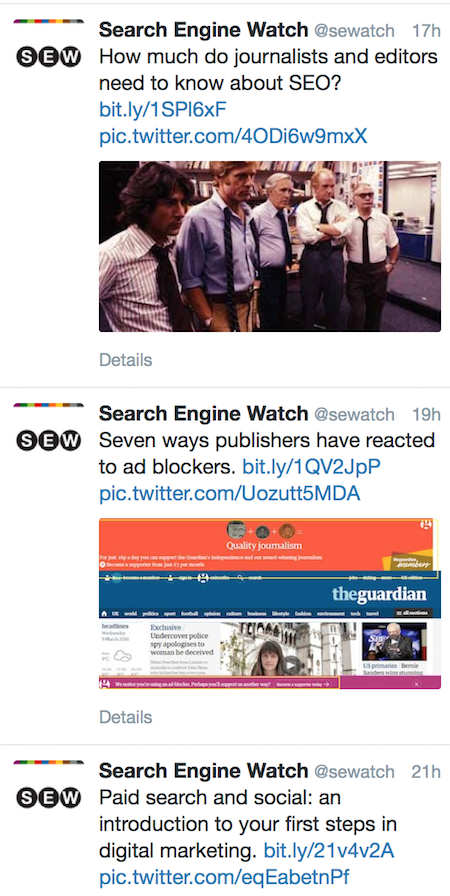
So, the headline needs to work alone as, hopefully, these examples from SEW’s Twitter do:


sew tweetdeck


4. Think about headline length


The web, in various ways, limits the length of your headlines:


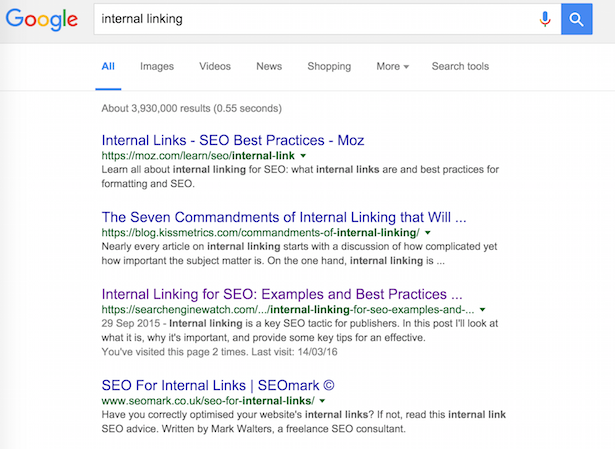
  • Google will only show the first 55-60 characters of a page title, so bear this in mind when creating headlines. Keep it under 55, or consider what will happen if it cuts off at that point. We’ve just about made it with our internal linking article, while Moz and SEOmark are well within the limit. As for the KISSmetrics post, we’ll have to click to find out what these commandments will do…page titles google

  • Social media. Consider the character limits on social posts. For example, if you want to tweet an article, adding the URL and image, then the headline shouldn’t be too long.

  • Email newsletters. It varies according to the device or email program your subscribers are using, but shorter headlines are more likely to be viewed in full.

  • Readability. Sorry to state the obvious, but it’s easier to read and digest a shorter headline quickly. Make it too long and people are less likely to read it.


All in all, my advice would be to keep headlines under 60 characters where possible, especially if you’re looking to create evergreen content which works well in search results.


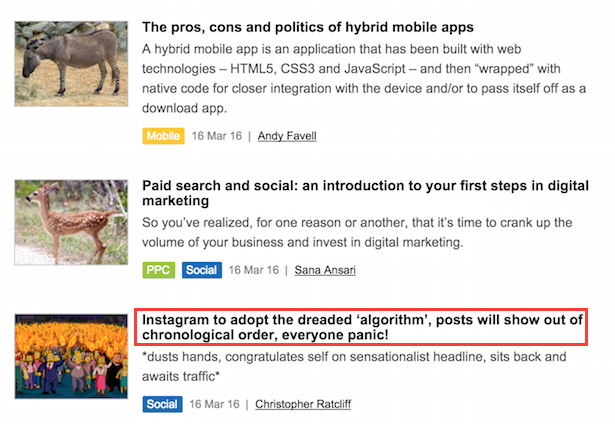
Which is why the following headline is 103 characters long ;)big headline


5. Don’t promise what you can’t deliver


This ties in with the clickbait point to an extent, but you can write a good headline and not deliver on the content.


Now, some of this comes down to quality. If you offer what you bill as ‘killer tips’ and they’re just collated from a bunch of posts around the web, without much original thought or detail, people will feel like they’ve been had.


There’s a tendency towards adjectives in headline writing that can sometimes oversell content -‘amazing tips which will supercharge your content marketing’ etc.


If you’re going to go bold, you’d best be confident that your content matches the title. I’ve gone for ‘the ultimate guide’ on a recent ClickZ post. Think I’ve gotten away with it so far…


6. Be concise


As we know from point four, there are a number of reasons to keep headlines relatively short.


Take time and look at your headlines. Is every word essential? If not, remove it.


7. See what works and learn from it


Take a look at your analytics, and look at the articles that are being shared more on social media. Can you spot a few common features?


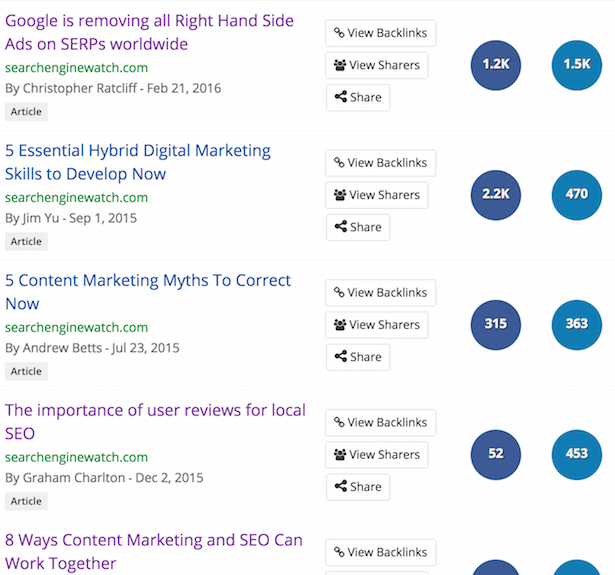
For example, these are the five most shared SEW articles from the past six months, as shown by Buzzsumo.


I’d say in all cases the title tells the user what to expect if they click on it. They’re all relatively short too, and of course, we have a couple of lists in there.


Buzzsumo headlines


It’s good to look at a mixture of tools to get the right idea. What works on social isn’t necessarily the same as what works in terms of traffic, or in terms of leads or conversions.


However, some common factors should emerge that will help you create better headlines.


8. Add keywords to headlines


The rule was always to front-load keywords, but this is supposed to be less important to Google now. I’d still want to get my keywords in the title though.


It will help with ranking, it’s more likely to be used as anchor text if people link back to your site, and these keywords can also catch the attention of your target audience on social sites, in newsletters or in search results.


9. Don’t be afraid of lists


It’s easy to mock the listicle, but the plain fact is that they work well online.


People like lists, it tells them that the article has a defined structure and should therefore be easy to read and digest.


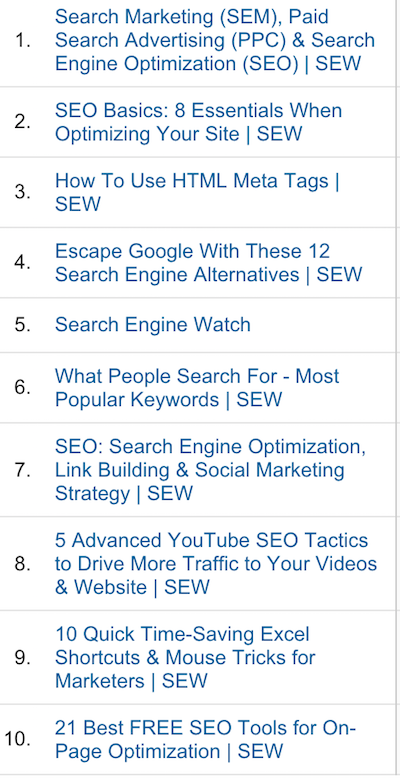
These are the top ten pages from the past year on SEW. Five are number, six are lists. If I stripped out the homepage and category pages, there’d be more.


sew lists


‘How to’ also works well for us – four of the top 20 fit this pattern. Then there’s asking and answering a question – these work on people’s natural curiosity and, if written well, are useful to the reader.


10. Collaborate on headlines


Sometimes I’ll come up with headlines alone, but I find it helps a lot to discuss with colleagues and bounce ideas around.


You may think you have a good headline already, but maybe someone else has a better idea.


In summary


While you’ll find plenty of headline generators and formulas around, headline writing shouldn’t be too automated.


There are key factors to consider, rules which are worth following (most of the time), and some things to definitely avoid, but headlines also have to reflect the personality of the site and its audience.


Also, you’ve got to mix it up. If every headline is a numbered list, won’t look good even if it works for traffic (unless you’re Buzzfeed).

Friday, March 18, 2016

What performance marketers need to know about Google Knowledge Graph

Last week artificial intelligence achieved another victory over humankind.


Google DeepMind’s AlphaGo program won 4-1 against Lee Sedol, one of the best Go players in the world, in a milestone that experts thought was a decade away.


Of course, AI is about much more than winning board games. Google’s RankBrain AI powers its Knowledge Graph search results, bringing context and semantics to the traditional keyword-based search.


And with last month’s appointment of John Giannandrea, AI expert and Knowledge Graph founder, as Google’s new head of search, this is clearly an area Google is interested in.


For performance marketers, this needs to be paid attention to. Not only is Knowledge Graph an important tool that needs to be understood and utilised, but the AI powering it needs to be communicated with to ensure that it receives accurate information.


What is Knowledge Graph?


Say that you type into Google the name of a famous person, a tourist destination, a business, or any one of a whole host of objects or people that are frequently searched for. What you will most likely encounter is a panel along the side and/or the top of the results that provides additional information about what you searched for.


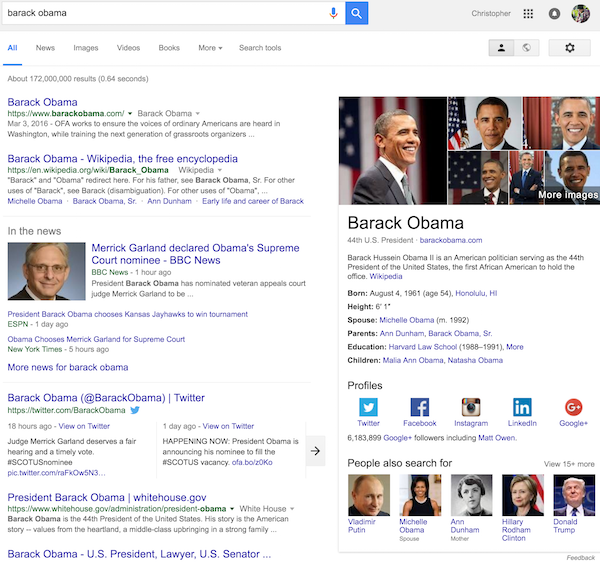
For example, if you search for ‘Barack Obama’, you will see a side panel with pictures, information about when and where he was born, his family, his social media profiles, as well as some ‘people also search for’ results.


barack obama Google Search


Similarly, if you search for ‘Eiffel Tower’  you will get information relevant to the building, such as the address, height and opening date.


If you type a flight number, the weather, or the definition of a word, you will get a Quick Answer Box at the top of the results that gives you essential information about the concept you have searched for. And there are plenty of other queries that will trigger this type of result.


This is the Knowledge Graph. It’s essentially a database that provides relevant contextual information and facts about millions of entities from across the web and shows it in search results.


This database is built up using artificial intelligence software that scans the web, interprets what it sees, and stores the insights that it finds. Rather than simply seeing the words on a web page or in a search query, the search engine tries to understand what the sentence actually means and make smarter judgements as to which results are relevant.


Of course it’s not just Google that has this technology. Microsoft has its “Satori Knowledge Base”, Yahoo has started working on its own solution, and Wolfram Alpha has had its own smaller version of this for many years.


What does Knowledge Graph mean for performance marketing?


Knowledge Graph isn’t just an interesting concept. It’s also an online space that performance marketers need to occupy if they want to stay ahead.


Approximately 19% of search results now feature Knowledge Graph results. And on mobile, these take up a sizeable amount of screen space.


Knowledge Graph has become a prominent part of the search experience, having a significant effect on your audience’s judgement of you and your products. Reaching the top of Google search results (organically and/or through AdWords) is no longer the only objective; inaccurate or poorly optimised Knowledge Graph results could seriously undermine your brand.


Although machine learning programs do their best, they don’t always interpret what they see correctly. And this can lead to problems if Google is displaying inaccurate information about your business: an outdated phone number, for example, could cost you a lot of clients.


To make up for this, Schema.org was founded and sponsored by four of the big search giants (Google, Microsoft, Yahoo, Yandex) to create a method for websites to explicitly give search engines this semantic information. In practice, this involves adding extra code to your website to indicate what type of object you are referring to in a piece of text.


Yet surprisingly few people have made use of this tool. Even though it has been around since 2011, as many as 80% of websites still haven’t used Schema.org markup. But this isn’t something that performance marketers should overlook – making sure that Knowledge Graph results have accurate and useful information for your brand is essential.


Knowledge Graph in the future 


Today if you want people to hear you, you cannot just speak to your target audience. You also need to speak to the programs that are filtering and interpreting the web for them.


Helping the top search engines understand the meaning and the context behind your website is now a key part of achieving the most beneficial results.


Knowledge Graph has a lot of room to grow and become an even more influential part of how search engines work. We can expect the range of objects it can capture information about to increase, the information gathered to expand, and for consumers to become more familiar with using Knowledge Graph panels to get what they are looking for.


/IMG/391/331391/best-albums-of-2015-google-search


We can also expect Google’s competitors to try and outperform Knowledge Panel with their own solutions.


For performance marketers, the most important thing is to stay ahead of the game. By watching how this unfolds, and checking what new features are added, what trends are developing, and what you need to do to respond, you can start outmanoeuvring your competitors in this space.


Oliver Wood is the Managing Partner, Performance at Maxus

Wednesday, March 16, 2016

The pros, cons and politics of hybrid mobile apps

 A hybrid mobile app is an application that has been built with web technologies – HTML5, CSS3 and JavaScript – and then “wrapped” with native code for closer integration with the device and/or to pass itself off as a download app.


The hybrid app sits in the middle of the political battle between aficionados of the web/browser-based app and the native app.


Depending on your viewpoint, the hybrid app is the best-of-both-worlds or a botch that fails to match up to the qualities of either parent. Whether your app turns out to be one or the other often depends on the execution of the project.


  1. The best-of-both-worlds: hybrid apps have the cross-platform appeal of a browser-based app, but with added native coding to give the native functionality web apps traditionally couldn’t access.Plus, if web apps look and behave like a native, Apple will allow them into its App Store, normally reserved for apps written in proprietary code.

  2. The botch: combining web and native can end up with an app that lacks the slim-line elegance of the web app or the feature-rich performance of the native app.To minimize the chance of a botch, companies will need the appropriate hybrid development skills, to choose the right framework and JavaScript library and avoid embarking on projects that are too ambitious for hybrid development.


Robert M. V. Gaines, a Kansas, US-based web and app developer:


“Hybrid apps are great for small scale projects that need to be developed rapidly on a budget, but they are not a good option for apps that are computationally intensive or require extensive access to low-level device functions.


Hybrid apps that fall into these later categories can be created through the use of custom plugins, but it is usually easier to create such apps with traditional [native] methods. Before choosing to create a hybrid app, it is important to understand the strengths and weaknesses of this technology.”


Cross platform development with web technologies


Hybrid is a compelling story: write an application in pervasive, open-standards-based web languages that will work on any smart device via the device browser, then tailor different versions of the app with native code, so it works nicely as a download app.


At the core of each app is a shared code-base which brings big efficiencies to development and maintenance.


Certainly it is a lot more attractive proposition than writing a native app in Java for Android, then rewriting it in Objective-C or Swift for iOS; then C# or C++ for Windows.


For most companies skilling up on multiple native coding languages isn’t an option. It shouldn’t surprise anyone that HTML5 and JavaScript is the primary platform for North American app developers, according to Vision Mobile, and second most popular platform in Asia after Java.


dev_language_share_2015_cz10


In September 2015, the creators of Updown Fitness,  a workout/weight-training fitness app, decided they wanted the additional distribution of app stores by creating a download version of their web app.


Chris Freise, CEO and co-founder, Updown Technologies:


“Native was not an option as our developers did not have native experience. After doing some research, we decided on a hybrid approach and on the Ionic Framework to accomplish this.


The hybrid approach made sense because we could use our JavaScript/HTML/CSS web codebase with some small adjustments, and we could hit both of our target platforms with one set of code. We could also take advantage of Cordova plugins to access the phone hardware, which would allow us to do some cool things with the mobile app that we could not do with the web app.”


updown_dev_cz10


Image: testing and troubleshooting the Updown Fitness mobile app with Ionic developer console tool.


Harnessing the advantages of web and native apps


In a previous column on web apps, we highlighted Saxo Bank’s impressive browser-based trading system, which supports 170,000 FX trades per day.


In addition to the accessing the system via a mobile browser, Saxo Bank clients can also download mobile apps to their devices.


Benny Boye Johansen, senior director and enterprise architect at Saxo Bank tells ClickZ:


“Why do we even bother having a [download] app? There are two main reasons. The first one is distribution. People are so used to getting apps from an app store. They want the SaxoTrader App rather than having to go to saxotrader.com.


The second reason is that having a native app provides support for the few features, which a pure HTML app still cannot do. In our case, that is support for push notifications and touch login. So, the core trading app can run perfectly on your mobile just by going to saxotrader.com. But unless you take the downloadable app, you will not get “the complete feeling of an app”, including push notifications and touch login.


Now you may argue that we are not 100% purely HTML, and you would be right. But if you look how we have spent out development dollars, 95% has been deployed on HTML5/JavaScript development and the remaining 5% has been on a native iPhone and native Android application. This is still much better than spending 50% on iPhone and 50% on Android.”


The interesting thing is how having a web app with a minimal “wrapper” of native code allows Saxo Bank to continually maintain and enhance the core app, without needing to save it for the next version or needing to resubmit it to the app store authorities for evaluation.


Johansen:


“We have spent a very small part of the total development budget to create these wrappers. And, since all the core/important functionality is in the web application, we don’t have to spend any more money on extending the native part when we introduce new business functionality – we don’t even have to submit a new version to the app stores.”


saxo_trader_go_cz10


It is worth noting that functions previously only available to native applications, such as push notification, location, camera and working offline are now or will be soon be available to web-based applications, which means hybrid apps will need even fewer native extensions.


Another advantage web technologies bring to apps is the ease if testing, as Updown’s Chris Freise explains:


“Most testing (of the app functionality that doesn’t require plugins) can take place in a browser. Changes can be tested with a refresh at the push of a button rather than having to do a full compile of the app each time.”


Performance: the need for speed


Every silver lining has a cloud. For hybrid (and web) apps there has been a big question mark over performance versus native apps. This is mostly about how quickly the app reacts to user interactions.


Whether this is real or perceived; whether users a) notice or b) care; and the extent to which performance issues are caused by poor development techniques and inappropriate choice of framework and JavaScript library has been hotly debated for years.


For example, Drew Crawford: Web apps are slow, Dan Bricklin: Oh no they’re not.


The jQuery Mobile JavaScript library has received some criticism for being too large for mobile apps as it was built for mobile web. See here or here.


Yet the creator of the jQuery library John Resig was recruited by Khan Academy to help build their apps – often cited as a poster boy for hybrid apps – and to establish their computer science curriculum.


But the most important thing is what the users think.


Pieter Gorsira is lead developer and co-founder of Lawnmower, an app for Android and iOS that enables people to passively invest their spare change in the digital currency Bitcoin:


“As far as native vs. hybrid, you aren’t missing out on much by going hybrid. Also, it really depends on the application. The Lawnmower app is really just a nice interface for a user to interact with their Lawnmower account. For this purpose, native really doesn’t offer anything special over hybrid.


It used to be that hybrid apps suffered performance-wise (especially with transitions etc.) but that era is long gone. Most consumers have no idea that Lawnmower is a hybrid app and would be unable to tell the difference between native and hybrid performance. For something with bleeding-edge performance needs, you may need to go native, but for 95% of apps the hybrid approach is more than sufficient.”


lawnmower_landing_cz10


Choosing a framework


The best known framework for building cross-platform hybrid apps is PhoneGap which has been downloaded over 1 million times and is being used by over 400,000 developers.


PhoneGap is built on an open source platform called Apache Cordova, which was donated to the Open Source world by PhoneGap’s owners Adobe.


Other frameworks also use the Cordova source, such as Ionic, Monaca, Onsen, Telerik, Intel XDK and Framework7.


See these analyses of the leading platforms by Noeticforce or Tutorialzine.


Choose a framework that:


  • Has a pedigree, commercial backing, active community, good customer base, and been used to build lots of good apps (like yours).

  • Has lots of tools, plugins and a good JavaScript library – all of which, should be well-documented and well-maintained.

  • Fits the purpose of your app – some frameworks are more suited to enterprise apps, others to consumer or games and some are better for cross-platform development.

  • Plays to your strengths e.g. if you have worked with Angular JS choose a framework that is based upon it, such as Ionic; if you are new to hybrid app development, choose a more straightforward framework.


Or no framework


When you break down most hybrid apps, you find a web app and/or web site displayed with an in-app web browser called WebView with some additional native code, often formed of plugins. This set-up doesn’t require a framework.


Magnus Jern, president DMI International:


“It’s also becoming more and more common to create your own hybrid apps combining a shell with the main menu and core functionality, mostly with WebView content. Over the past year, Apple’s App Store has become increasingly friendly towards apps that use WebView, since browser performance has drastically improved.


This is the most common method for m-commerce apps, used by Abercrombie & Fitch, GAP, H&M, Mango, Furniture Row, TK Maxx and others, as it means they can develop a thin layer of native core functionality such as push notifications, barcode scanning and geolocation with all the product catalogue and commerce functionality based on responsive website in WebView.


For commerce apps, hybrid is usually the only alternative as the e-commerce platforms were not set up with APIs (e.g. REST JSON) needed to support native apps – therefore WebView is the only option.”


Plugins 


A plugin is a piece of ready-to-use code that enables hybrid applications to access the native functions of the device, such as camera, barcode-scanner, touch ID, geolocation, NFC and push notifications.


cordova_plugins_cz10


There are repositories of plugins such as Cordova Plugins which boasts 954 plugins as well as and smaller specialist ones such as ngCordova for Angular JS users. But the environment still can cause frustration for developers.


Updown’s Chris Freise:


“The Cordova plugin landscape is quite disorganized. On more than one occasion we’ve installed a plugin only to discover that the application will no longer compile due to conflicts with another previously installed plugin. This has resulted in us having to spend time to find some creative workarounds, even having to abandon a specific plugin altogether.


The plugin environment is improving, though. Sites like ngCordova have done a good job aggregating the best and most useful plugins in one place and linking out to the setup documentation.”


Good press/bad press


It’s difficult to get a definitive list of big-name download apps that are hybrid. VenturePact lists Amazon Appstore, Evernote, Apple App Store, Gmail, Khan Academy, Instagram and Twitter as hybrid apps.


Yauh adds Feedly and Mafia Wars to the list. Both also include Uber, but the company says this is false. Telerik cites Basecamp and Yelp.


If you have too much time on your hands you could conduct an investigation yourself.


Over the years, the news that some big names have dropped hybrid apps for native, has caused damage to the credibility of both web and hybrid apps.


These include LinkedIn in 2013 and Facebook in 2012. Facebook’s slating of HTML5 prompted quite a backlash. Sencha even built a Facebook web app to prove Facebook’s failure couldn’t be blamed on HTML5.


Ecosystem


Developers are dependent on a healthy ecosystem, which means a ready supply of tools, methodologies and reusable code – including plugins in the hybrid environment.


The main reason LinkedIn gave for its change of direction in 2013 was lack of mature development ecosystem, including lack of tools – e.g. for debugging the software.


Back then Kiran Prasad, senior director for mobile engineering, LinkedIn said:


“It’s not that HTML5 isn’t ready; it’s that the ecosystem doesn’t support it. There are tools, but they’re at the beginning.”


In three years, of course, things have changed a lot. Today the number of developers building web and hybrid apps has swollen massively, all contributing to methodologies, skills, plugins etc., and creating a massive market for tools vendors.


As noted previously, HTML5 and JavaScript is the primary platform for more US app developers, than any other platform.


This isn’t just about the open source community, there are plenty of tech heavyweights investing in hybrid app development, platforms and tools – particularly around enterprise apps (internal apps developed by companies to mobilize their workforces), which has all helped to boost the ecosystem.


These include SAP, IBM, Oracle and Intel.


Money


One of the major advantages of hybrid development is that can cost less – a lot less, according to San Diego web shop Comentum – than developing native apps for each platform as well as a web site/app.


But the more custom native development on top of the web app, the more each app is going to cost.


DMI’s Magnus Jern:


“It’s not that a hybrid app is not good enough for the consumer. Most customers probably don’t care as long as the performance, reliability and UX is good.


The main challenge is that the cost of delivering a native like experience using hybrid is usually higher than developing real native apps for iOS and Android. Therefore few companies that have gone down that path will talk about it. LinkedIn, Twitter and Facebook all went down the hybrid route to start with ‎and then had to redo their apps from scratch.”


ClickZ attempted to contact several of the big-name hybrid apps, but found none keen to discuss it.


Pros and cons of hybrid apps


The key advantages and disadvantages of hybrid apps, summed up by Robert Gaines:


Pros


  • Facilitates rapid prototyping and development.

  • Affordable, especially for small to mid-sized businesses.

  • Allows the creation of a cross-platform codebase that is easy to maintain.

  • Web professionals are able to leverage existing skills.

  • Access to native functionality through plugins.

  • Ability to offload computationally intensive tasks to high performance native plugins.

  • Consistent APIs that are normalized across platforms.

  • Eases the conversion of web apps to mobile apps that can be listed in app stores.

  • Supports flexible, cross-platform, UX through CSS3, HTML5, and JavaScript.

  • Ensures access to web APIs that may not be available on all browsers.

  • Hybrid apps don’t require web access, but they can take advantages of web services through JSON.


Cons


  • Developers must account for device specific quirks.

  • Updates may be required to account for new OS releases.

  • Few experienced developers are available.

  • Computationally intensive tasks must be moved to native plugins.

  • Requires a different perspective on optimization and performance than traditional web apps.

  • Many hybrid app developers lack the skills necessary to create a polished end product.


This is the tenth part of the ClickZ ‘DNA of mobile-friendly web’ series.  


Here are the others:


  1. Six mobile strategy questions. 

  2. How to identify your mobile audience 

  3. Why prioritize mobile-friendly web? 

  4. Web apps: advantages of native apps in a web browser

  5. How to test the viability of your mobile project 

  6. Assessing the technical and operational feasibility of your mobile project 

  7. Show me the money: proving your mobile site or app will deliver ROI

  8. Formulating the go-to market strategy for your mobile project

  9. How to market your mobile site or app without spending a fortune on ads


Andy Favell is ClickZ columnist on mobile. He is a London-based freelance mobile/digital consultant, journalist and web editor.


Contact him via LinkedIn or Twitter at Andy_Favell.

Tuesday, March 15, 2016

Google AdWords average conversion rates by industry [study]

When you evaluate your Google AdWords performance and conversion rates, what are you comparing against?


If you’re like most advertisers, your primary source of insight is probably your own historical data. As long as you’re trending towards better than worse, you’re doing great… right?


Not really.


CVR meme


It’s important to track your performance over time and make sure you’re constantly improving, but using only your own data tells you nothing about how you’re doing against your competitors (AdWords is a live auction, after all).


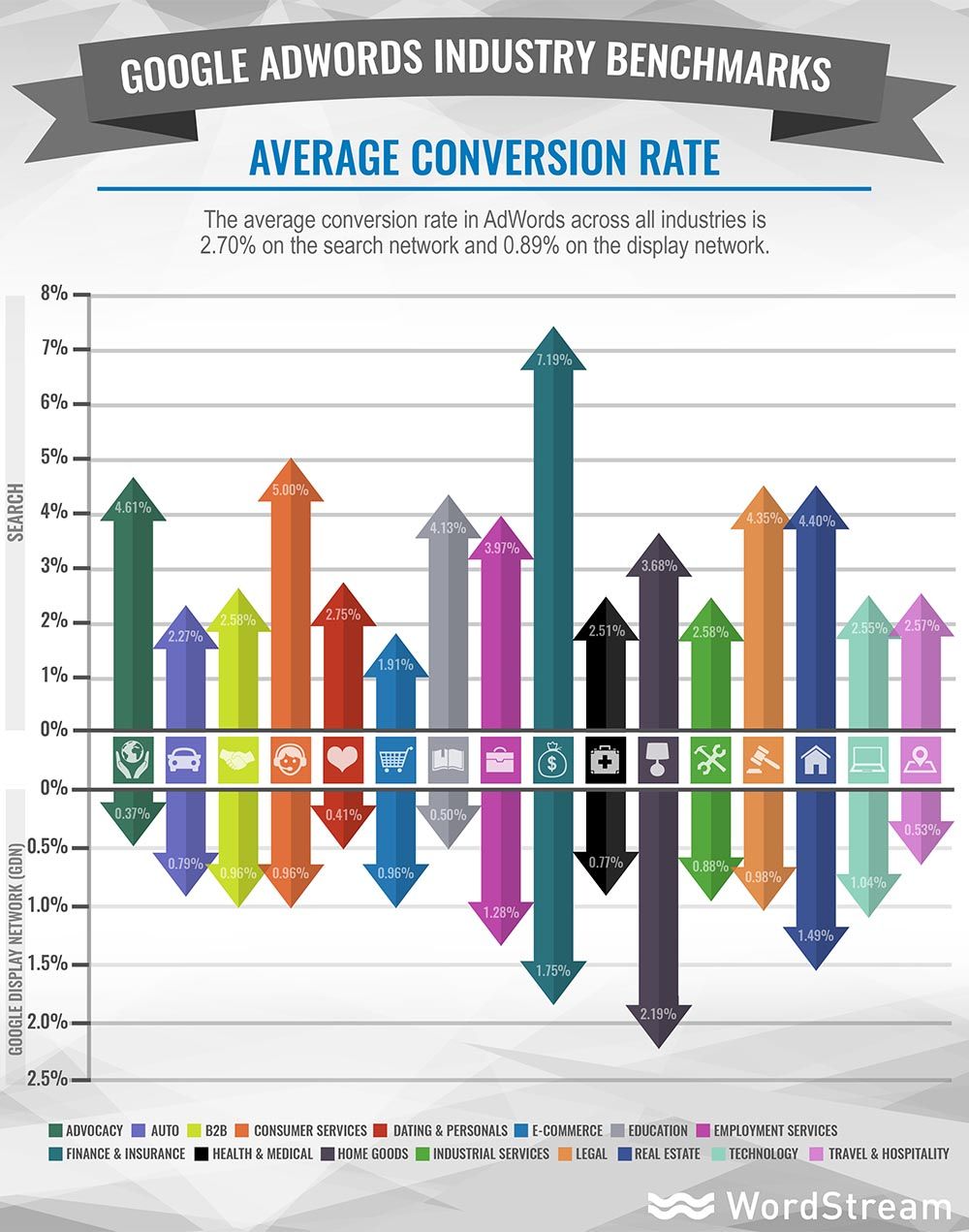
We recently ran an extensive analysis of more than 2,000 client accounts in all verticals, representing over $34 million in AdWords spend, to establish current, accurate average conversion rate (CVR) benchmarks for both Search and Display ads across 20 different industries: Advocacy, Auto, B2B, Consumer Services, Dating & Personals, E-Commerce, Education, Employment Services, Finance & Insurance, Health & Medical, Home Goods, Industrial Services, Legal, Real Estate, Technology, and Travel & Hospitality.


What is the average conversion rate on Search & Display?


So how do you know whether you’re middle of the road, or getting left in the dust?


We found that on average, Google AdWords advertisers are seeing conversion rates of 2.70% on the Search network, and 0.89% on the Display network.


Benchmarks are an important consideration on top of your own data, because if you were getting 1% conversion for your Search ads and doubled it to 2%, you might think that was pretty awesome. You doubled your CVR, that’s amazing! Woot!


Except you’re still doing 0.7% crappier than the average, and the average isn’t exceptional. It’s just… average.


Don’t settle for average conversion rates – be a unicorn in a sea of donkeys


Who the heck aspires to be average?


unicorn meme


If you aren’t even doing as good as middle of the road, average might seem pretty attractive, but you can do so much better than that.


The range on conversion rates varies so greatly that the top 10% of advertisers are regularly getting conversions FIVE TIMES better than average. Not only can you be better than average, but once you surpass that plateau, you can do incredibly well in AdWords.


It’s crazy; there are all these accounts seemingly content to hover around slightly below or slightly above average. I call these advertisers the donkeys. They stubbornly just sit there, waiting for something to happen.


But then you have the unicorns; those accounts that are not only doing better than average, but slaying the averages by converting at exponentially higher rates – up to five times higher. These advertisers enjoy not only more conversions, but typically a way lower cost, too, as more engaging ads drive higher Quality Scores and lower CPCs as a result.


Don’t be a donkey.


So which industries convert best on the Display network?


The surprising top converting industry in Google Display ads


You might think that Travel & Hospitality or maybe Dating & Personals ads would kill it on the Display network, because they’re just so much sexier and exciting than other industries, but you’d be wrong…


They actually have the lowest conversion rates among industries for Google Display ads!


So which super sexy industry does best with Display ads? Well, um… it’s Home Goods. Would you believe ads about couches, lamps, desks and other furnishings and goods for the home convert at an average rate of 2.19% in Display? That’s higher than any of the twenty other industries we evaluated.


The top five best converting industry types for Display are:


  • Home Goods with an average 2.19% CVR

  • Finance & Insurance: 1.75% avg. CVR

  • Real Estate: 1.49% avg. CVR

  • Employment Services: 1.28% avg. CVR

  • Technology: 1.04% avg. CVR


And who fares the worst? The average CVR in the Advocacy industry is an abysmal 0.37%.


Top converting industry average Search CVR is almost 3x higher than overall


In the Search network, one industry is killing it to the extent its average conversion rate is nearly three times higher than the average CVR across Search as a whole.


Insurance and Finance ads enjoy an average 7.19% conversion rate on the SERPs, a full 2.19% higher than the next highest industry average:


  1. Insurance & Finance: 7.19% avg. CVR

  2. Consumer Services: 5.00% avg. CVR

  3. Advocacy: 4.61% avg. CVR

  4. Real Estate: 4.40% avg. CVR

  5. Legal: 4.35% avg. CVR


Understanding these averages is critical, because how you fare against others in your area can seriously impact your costs and ROI. For example, you could be converting at 3.5% and think that’s pretty decent, yet find it hard to justify what you end up with as your cost per acquisition. That might leave you thinking AdWords just doesn’t work for you.


But if you’re in Consumer Services, where the average conversion rate is actually 5%, the reality is that you’re seriously underperforming. If you’re converting less than average, your ads aren’t resonating, your QS is going to suffer, and you’re going to pay MORE for each click.


Check out the average Conversion Rates across the 20 industries we analyzed and see how you stack up:


adwords-industry-benchmarks-average-conversion-rate


For new Google AdWords benchmark CPCs, CTRs and CPAs by industry, see our full analysis on the WordStream blog.

Seth Godin on titles, transformation and Trump [video]

The countdown to ClickZ Live New York is on and with five weeks to go, our keynote speaker, renowned marketer Seth Godin, stopped by our office for a chat.


With ClickZ Live New York just a month away – you’ll be there, right? – we invited our keynote speaker to come hang out with us. And we filmed it, just because we weren’t sure if you’d believe us when we told you who we got this year.


Seth Godin is a marketing guru (though he’s too humble to accept that term), an entrepreneur and a speaker, as well as the bestselling author of 18 books. We tried to get Godin to tell us about his upcoming presentation; he wants it to be a surprise, though he did give us a little sneak peek. So instead, we talked about a bunch of different things, starting with those books.


His titles are catchy, often seeping into the marketing lexicon. ‘Permission marketing’ has its own Wikipedia page and ‘purple cow is so well-known that it was the title of one of our sessions at SES Miami last year. Where do these names come from?


“The purpose of the book is to make its way into the lexicon. That’s why it deserves to be a book. Most people don’t go into a bookstore looking for an idea, but if I give a few people a tool they can bring to the next meeting, they can explain their idea and the easiest way is to give it a name,” explains Godin. “So the name comes first. If there is no name, there is no book. I won’t write a book unless I come up with a way to talk about it.”


We also talked about the inspiration for Godin’s daily blog posts, who inspires him, and digital transformation, which is also the title of our newest (and coolest) track. You can’t talk about digital transformation without talking about disruptors. Companies like Uber, Airbnb and Netflix have turned their respective industries upside-down. Which industry is begging to be disrupted next?


Godin shared with us his prediction of what’s next, as well as his opinion of another big disruptor: Donald Trump. Given what’s happening in the country at the moment, we were curious to hear his thoughts on Trump’s unique campaign and he definitely didn’t hold back.


“I hate to take any shred of the smallest bit of credit for this neanderthal splitting our country into pieces, but it’s like he read all my books,” says Godin.


Wow, Seth, tell us how you really feel.


But this video is just a preview of what’s to come. We’re assuming you want more, so we guess we’ll see you next month in New York!


Friday, March 11, 2016

Google issues guidelines on bloggers and links for freebies

The practice of brands engaging with popular bloggers seems to have caught Google’s attention, with the search engine offering some advice on what bloggers should do in this situation.


Or, as it’s very easy to interpret, Google is suggesting it may take action if it deems that links have been added to posts in return for free goods.


In its post, Google advises bloggers to nofollow links to company’s sites, social pages and any sites selling the product in question.


The advice:


Bloggers should use the nofollow tag on all such links because these links didn’t come about organically (i.e., the links wouldn’t exist if the company hadn’t offered to provide a free good or service in exchange for a link).


Companies, or the marketing firms they’re working with, can do their part by reminding bloggers to use nofollow on these links.


Google also adds that bloggers should disclose any relationships, just as if this was a form of sponsored content.


I think the key point here is Google’s assertion that ‘links that pass PageRank in exchange for goods or services are against Google guidelines on link schemes’.


The threat is implicit here – if Google sees a relationship between freebies and followed links, then the blogger may suffer.


It’s a grey area, to say the least. If bloggers are accepting gifts in return for links, and that’s the basis for the freebies, then such bloggers can’t complain.


However, there are legitimate reasons for bloggers to receive freebies and these bloggers will often seek to make money through affiliate links. This is how they pay for hosting, or to cover the time they spend writing.


links


For example, a gadget or video game site receiving items for review may then place links to Amazon where people can buy said items.


These reviews may be positive, they may be negative. Will Google take this into account before possibly penalising such bloggers?


If companies are sending products to bloggers and genuinely looking for feedback, why should that blogger not link to a site where readers can buy them? Is that not a natural link?


The fact that Google is issuing advice at all suggests there may be consequences for bloggers here, and I’d advise caution.


However, I think Google is stepping into a very grey area here. Some relationships between bloggers and brands may be obviously quid pro quo, but in the absence of clear contracts, I wonder how Google will ‘enforce’ this, and whether bloggers who have legitimate relationships with companies will be penalised.


For brands, it seems that blogger outreach, considered a legitimate marketing tactic, is now very much on Google’s radar.

Thursday, March 10, 2016

10 remarketing facts that will supercharge your PPC strategy

Hey you guys! All these articles about the dangers of creepy remarketing make me want to barf.


I think advertisers who are scared of remarketing are either using remarketing all wrong, or have a poor understanding of the awesome power of remarketing.


I’ve been using remarketing at WordStream since 2012 and last year, we spent over $500,000 on these ads alone. Why?


Because they’re freaking awesome.


If you’re sitting on the fence and unsure about giving it a try, I’m going to give you a swift kick in the right direction with these 10 remarketing facts that will make you rethink your entire PPC marketing strategy.


Please note: this article was first published on the Wordstream blog and it was so darn helpful that we wanted to share it here. 


1. Remarketing conversion rates INCREASE over time


Remarketing naysayers preach being very conservative with impression frequency caps and membership duration to avoid offending potential customers.


Wrong. Not with remarketing.


weird-facts-remarketing


We’ve found that conversion rates actually increase the more users see an ad within remarketing campaigns. It’s true that click-through rates decline over time, but those people who do click on your ad, after having seen it a few times already, become twice as likely to convert!


Understand that people are busy and have other stuff going on in their life. Remarketing gives people a gentle reminder to finish what they started on your site, while reinforcing your branding and messaging to that user every time they see you around.


They’re getting to know you, and learning to trust you, and when they finally do have a free moment, they are increasingly likely to do business with you.


2. The whole remarketing “Creep Factor” is ridiculously overblown


Another reason why I’m so dismissive of remarketing-creep-factor-worry-warts is the notion of ad fatigue.


If your customer prospects are so creeped out by your ads, you would expect them to ignore them, right? Well if they’re so mad at your dumb ads, they certainly won’t bother clicking on them. It follows that a very easy way to determine if this assertion is true or false is to calculate ad fatigue.


Ad fatigue refers to the notion that the more times you see an ad, the less likely you are to click on it, because people tire of seeing the same thing over and over again. If users are mad or annoyed at your ads, they should fatigue at a faster rate.


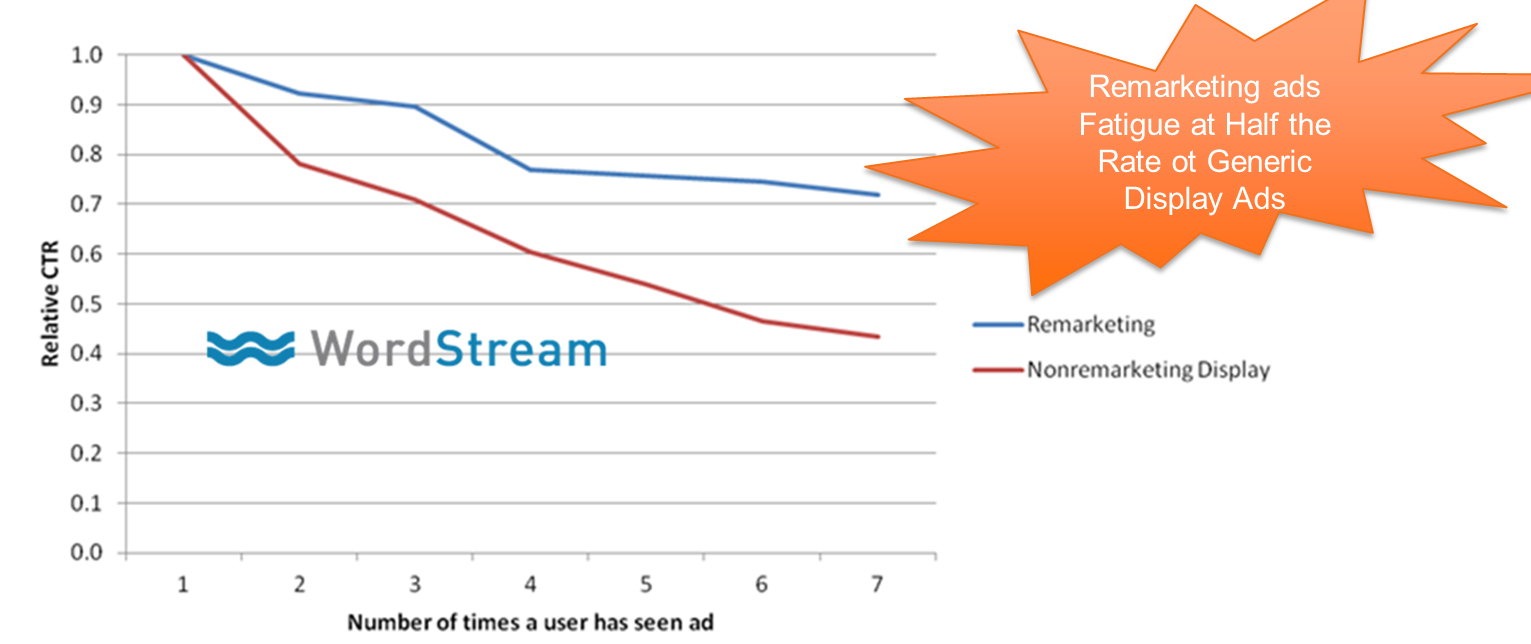
Well, I looked at thousands of display ads and compared the impact of ad fatigue on remarketing display ads vs non-remarketing display ads (e.g. Managed Placements, Keyword Targeting, In-Market Segments, etc.) and guess what?


Those “creepy” remarketing ads fatigued at half the rate of non-remarketing targeted ads :\


remarketing-ad-fatigue-myths


So if your remarketing ads are so “creepy,” why do people stay interested in them for twice as long as regular display ads, and convert at higher and higher rates with each incremental ad view?


And why is it that none of the “beware creepy remarketing” articles have any data to back up their arguments? Maybe it’s because the whole creep factor argument is baloney!


Also, remember that there’s no reason why you can’t rotate though multiple different display ads using remarketing to make your remarketing ads even more useful and interesting.


3. Facebook and Google Display Network offer the best reach


Where will you get the most bang for your remarketing buck? Right now, Google Display Network and Facebook offer the greatest reach for your remarketing campaigns.


GDN reaches 90% of Internet users worldwide, 65% of whom they reach every single day. More than a trillion impressions are served to over 1 billion users every month (source: Google). Meanwhile, Facebook has more than 1.4 billion users, over a billion of whom logged in yesterday (source: Facebook).


I always like to run my remarketing ads on both GDN and Facebook and find that both are incredibly powerful.


4. Remarketing is incredibly powerful for brand building


Guys, you know I’m crazy about both search ads and organic search, but they both suffer from this one small issue.


It’s very hard to build a brand using tiny text ads and organic search listings, which have a very limited amount of character space and don’t support logos and all the other visual elements that marketers typically use to build a brand.


Display remarketing is a fantastic way to build your brand because there’s so much more creative magic you can infuse into an image ad that will make your customers love and remember you.


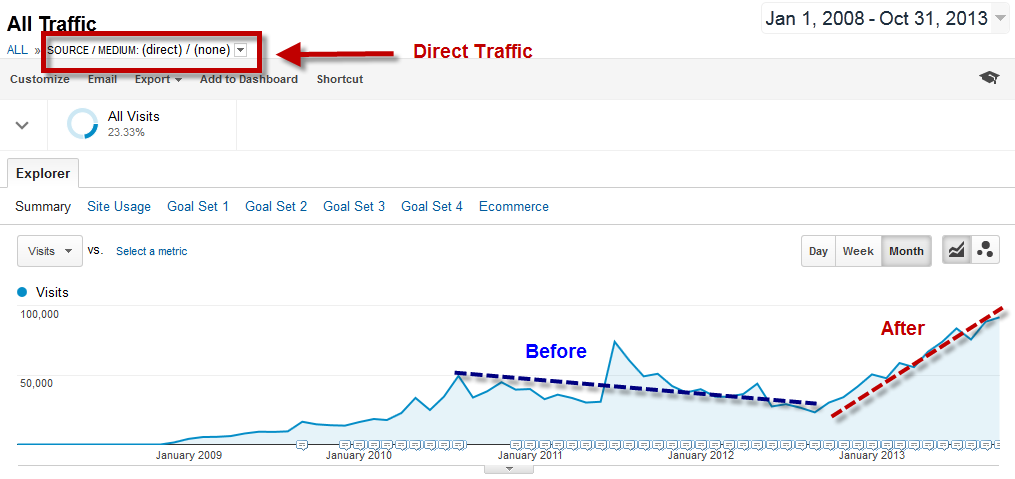
I discovered the power of this a few years ago, when I realized the vast majority of our site traffic:


  • Came to us through non-branded organic searches,

  • didn’t convert,

  • and left and never came back.


We were awesome at getting people to our site, but totally sucked at getting them to remember us after they got here.


Enter remarketing.


remarketing-increases-brand-searches-return-traffic


Our remarketing campaigns for our PPC Grader were fairly aggressive and meant to convert people to trying it out. You can see the impact above, using direct traffic as a proxy for branded searches.


Just 18 months out, remarketing allowed us to increase our repeat visitors by 50%, boost conversion by 51%, and increase time on site by an insane 300%! Remarketing helped make our SEO 7x more awesome by keeping us in front of interested consumers and compelling them to take action.


5. Remarketing is an incredibly powerful CRO tool


The conventional notion of the marketing funnel is a totally outdated concept for CRO.


Today, you don’t have to go from impressions to clicks to conversions, losing people on your leaky landing pages. Let’s face it: the funnel is a desktop concept from 15 years ago, and we’re way past that now.


Today, consumers can parachute into your funnel at any stage. In fact, it’s more like a river in that your customers can flow in from any point, and they never really leave either, thanks to remarketing.


rethinking-the-marketing-funnel


Using remarketing and amazing new ad formats, you can cut out sections of the funnel entirely!


6. Quality Score exists on both GDN and Facebook


Repeat after me: I will just say no to ineffective low click-through rate strategies.


Trying to make your remarketing ads unattractive to discourage people from clicking in order to get “free impressions” is a Quality Score killer, which means you’ll get less impressions and pay more for the clicks you do get.


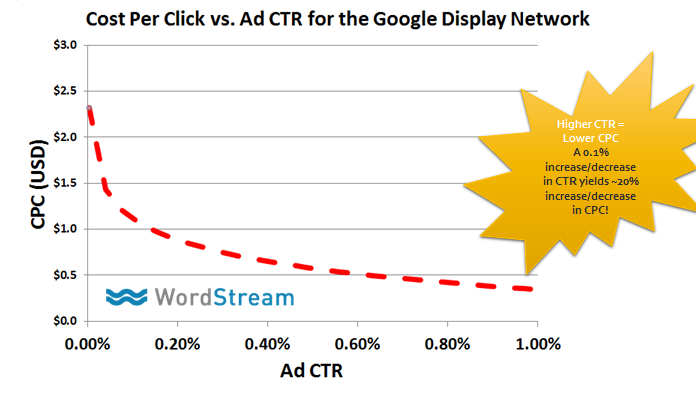
How important is this? Check it out:


cpc-vs-ctr-on-remarketing-display-network


On the Google Display Network, every 0.1% increase in CTR yields a 20% decrease in CPC! The same is true in reverse – decreases in CTR = increased CPC, which sucks.


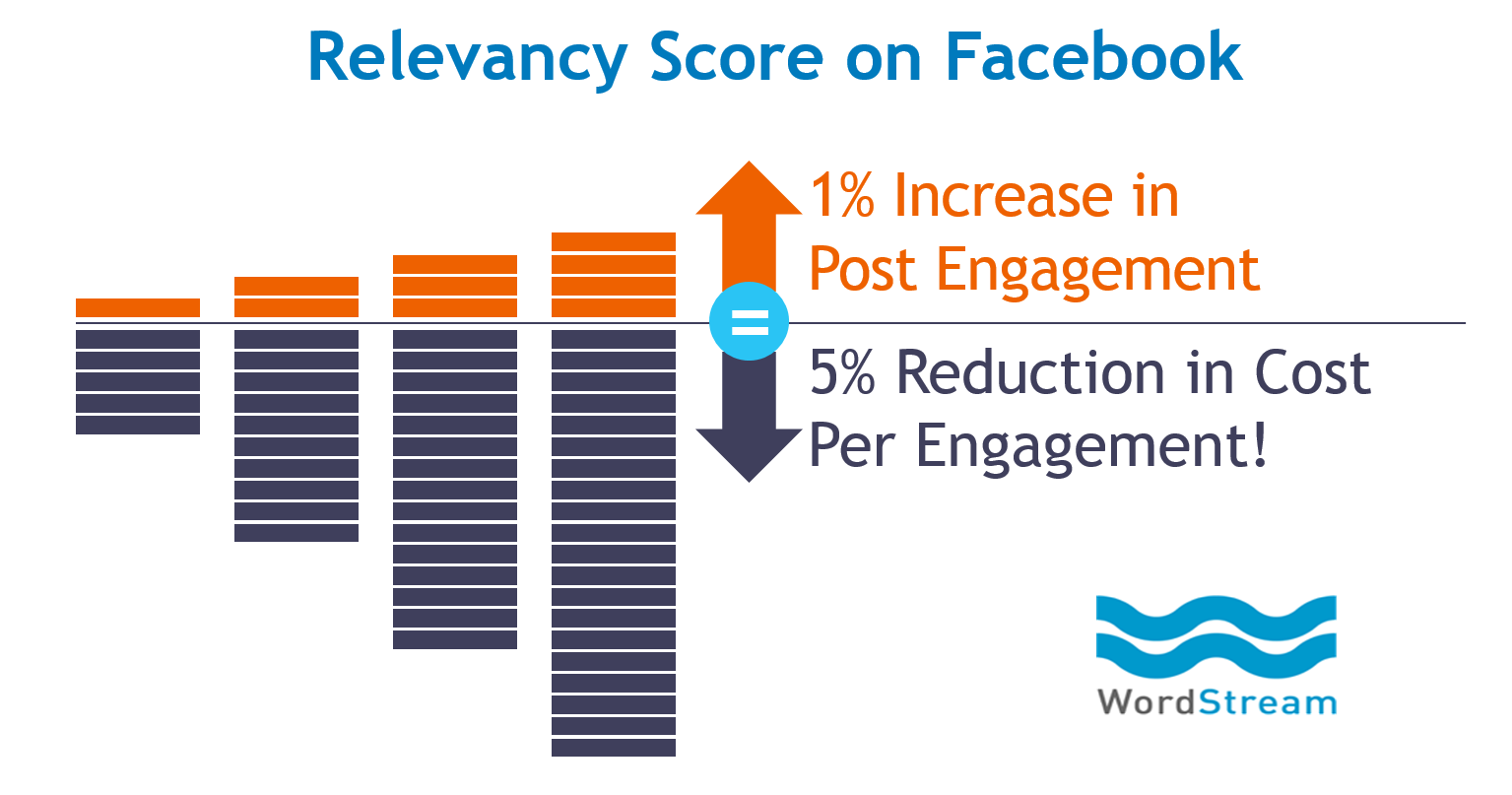
On Facebook, Quality Score (or ‘Relevance Score’ as they call it) is even more important! A 1% increase in Post Engagement (people liking, commenting, or clicking on your promoted posts) results in an average 5% reduction in cost per engagement:


about-relevancy-score-on-facebook


Basically you could be paying as little as 1/5 of a penny for clicks, or $5.00+ for promoting low engagement posts.


Aiming for low CTRs just flat out sucks as a PPC strategy and it’s even truer in display and social remarketing.


Don’t do it. Instead, take advantage of what you know about Quality Score and aim for super-engaging, super-clickable remarketing ads targeting the right people. They’ll convert better and cost you way less.


Tip: images do way better than text and now, Google may even automatically convert your “text display ads” into what they’re calling Richer Text ads (which are actually image ads).


7. Search ads convert the highest but display ads aren’t far Behind


Obviously search ads have the highest conversion rates due to the high commercial intent inherent in someone executing a keyword search.


A few years ago, display ads were nothing to write home about. But today, thanks to remarketing and other advances in display and social ad targeting, they convert almost as good as search ads, and even better than search ads, in some industries.


Here’s some data from a few hundred WordStream customers (Note: this is NOT official Google data):


cost-of-remarketing-clicks-versus-google-search-clicks


Remarketing converts so well because past browsing history is an incredibly powerful predictive signal for future commerce activities. You’re often targeting the same people who were searching for stuff on Google – just targeting them at a slightly later time.


8. Remarketing clicks are ridiculously cheap


Search ads in super-competitive industries can cost several dollars or more per click – and that’s just the average (with some keywords costing more like $50 per click).


Display and social remarketing ad clicks by contrast might cost anywhere from 2-100x less. Again, here’s some example data from WordStream customers:


remarketing-conversion-rates-for-different-industries


In short, you’ll probably see higher conversion rates with search ads vs. display/social remarketing, but the cost per click will also be higher. If the higher conversion rate is offset by higher click prices, it’s possible that social/display remarketing could deliver higher ROI.


9. Remarketing isn’t limited to display and social


We’ve talked a lot about remarketing in display and social, but they aren’t the only game in town. RLSA (remarketing lists for search ads) combines the intent of the search query with user context like location, device and time searched, but then it layers on browsing history, which makes for a super powerful combination.


rlsa-powerful-tool


On average, we’re finding that RLSA campaigns have 2x higher CTRs, 50% lower CPCs and convert at twice the rate of regular search campaigns!


10. ‘Super-Remarketing’ on Facebook & Twitter makes remarketing 10-100x more powerful


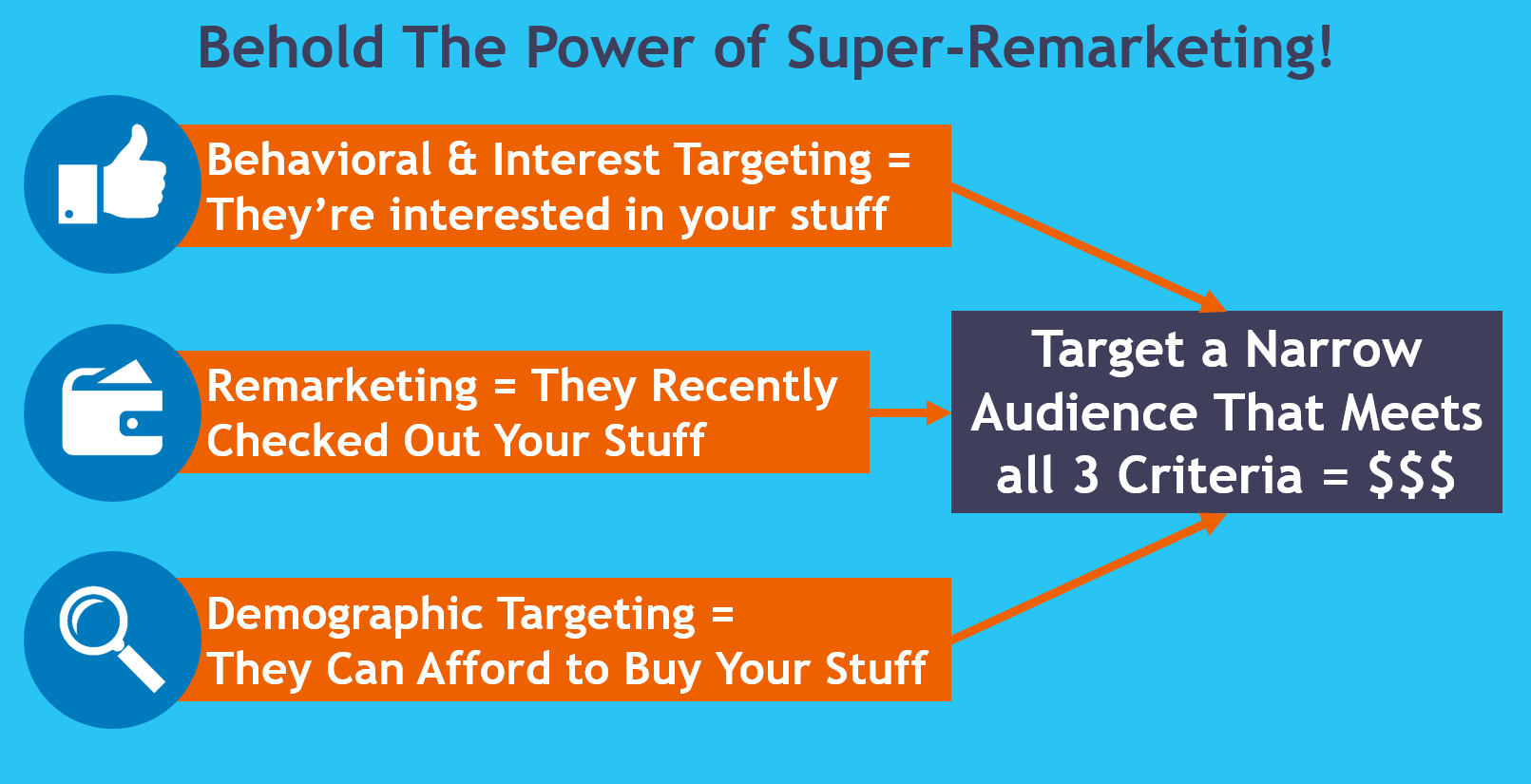
I love remarketing but it doesn’t make sense to target everybody who visits your site. Just because someone is interested in your products or services, it doesn’t mean they fit your target market. (Can they actually afford to buy your product?) Typically only around 2-4% of your remarketing cookie pool will convert to leads and sales.


So why do regular remarketing to everybody when you can do Super-Remarketing to just your target market instead?


In a nutshell, Super-Remarketing (a term I just invented right now, so don’t feel bad if you never heard of it) lets you filter your remarketing cookie pool based on thousands of social media demographic targeting options (age, life events, job titles, etc.) as well as recent purchase history and interests.


behold-super-remarketing


Currently Super-Remarketing is only supported on Twitter and Facebook’s ad platforms, but it’s so insanely powerful that I’m certain that Google will come up with something here in the near future.


Remarketing should make you rethink your entire PPC strategy


Remarketing is an essential component for paid search, social media and content marketers alike. It just makes everything work better.


Never let your prospects walk away or forget about you. Remarketing will save the day!