Google Trends Explore tool launches a new interface this week, but is it much better?
Unlike other Google changes, the only people that would notice this update are marketers, researchers and the periodic journalist from time to time.
I've examined the new look and feel, as well as features and functionality to see how impactful this change can be. Below is a quick breakdown of what's changed, and what hasn't:
New features (mostly look and feel, some functionality)
Updated interface: The look and feel has been refined to allow for easier navigation and simpler, single screen viewing of data.
Historical data by day: Archived trend data can now be viewed down to the day (upgraded from a month only view). This is perhaps the most important feature update, as we can now customize the range for specific dates when we know events are happening, such as news, sales, and product launches.
Geographic comparison: Comparing two or more search terms will now show you which terms are stronger by sub region on a single map.
Search term filtering: When comparing two or more search terms, you can individually filter by geography and time.
Export to Excel: All of the data components in the trend interface can now be exported to an Excel CSV file.
Mobile embed update: Mobile versions of charts for imbedding purposes is now available.
Features that have been removed (and likely won't be missed)
News & Forecast buttons: Users can no longer view “notable” news stories on your trend line nor can you forecast future search interest. We've found that this feature has typically been unavailable over the last few months.
Trending over time (MAP): The feature, which would allow you to view the geographic search interest changes over time, has also been removed. This feature was interesting for some very high volume searches, but also seemed to be pretty inconsistent.
Consistent features (under the surface, still the same)
Trend results: Results (the actual data) appear to have remained unchanged. It looks like you still get different results for pretty similar terms, plurals and misspellings.
Individual search term details: The ability to look at geographic search term performance as well as rising/top related queries remains intact.
Share & embed: Users can still share the results on social media as well as embed the charts on HTML pages.
Overall the new Google Trends tool just looks better, rather than being a total overhaul. But it does feature some improved functionality and everything useless has been removed.
Despite all the changes, it's still the same basic tool inside.
Michael Gauld is the VP/Director of Search Marketing at DigitasLBi.
You know, apart from the most obvious search engine. And possibly the second most obvious one too. In fact I'll start again, what are the eight most popular search engines after Google and Bing?
The first list below contains the most popular search engines currently available, ordered by most to least popular in the US. The ranking is according to eBiz, it's in order of estimated unique monthly visitors and is accurate as of August 2016.
The second list is a global overview of most popular search engines, according to Net Market Share, which is ranked in order of market share and is again accurate as of August 2016.
With 72.48% of the world's market share of search, as a marketer you don't really have a choice not to use it for both paid and organic reach.
As an every day user, for all of our cynicism and occasionally flippant references to The Circle, you have to admit Google is utterly indispensable in your every day life. For every interference (the constant curtailing of organic results) there are 10 triumphs… Google Maps, Gmail, the terrifying relevance of Knowledge Graph, the killing of payday loan ads, AMP…
Where the heck would we all be without the… yes, I'm going to say it… search giant.
2) Bing
Estimated Unique Monthly Visitors: 400 million
Alexa Rank: 22
Why should you use it?
As I said in earlier in the year in the aforementioned 'alternatives to Google' post, there are some great reasons to choose Bing:
Bing's video search is significantly better than Google's.
Bing often gives twice as many autocomplete suggestions than Google does.
Bing has a great linkfromdomain:[site name] feature that highlights the best ranked outgoing links from that site, helping you figure out which other sites your chosen site links to the most.
Yahoo will continue to operate independently pending regulatory approval of the deal, which is expected to be completed by early 2017. After this, all of Yahoo's news, finance and sports platforms will be added to AOL's media assets, which include The Huffington Post and TechCrunch.
4) Ask
Estimated Unique Monthly Visitors: 245 million
Alexa Rank: 31
Why should you use it?
Despite Google's determination to be the ultimate font of all knowledge on its own SERP, Ask is still good for specific question related searches, with results centring on Q&A related matches.
And hey, sometimes it's nice to get help from a butler.
5) Aol Search
Estimated Unique Monthly Visitors: 125 million
Alexa Rank: n/a
Why should you use it?
As mentioned above, the AOL you know and possibly love may become a different beast once Verizon Communications merges it with Yahoo.
Let's remember simpler times…
6) Wow
Estimated Unique Monthly Visitors: 100 million
Alexa Rank: 767
Why should you use it?
Because it works more like a news site then a search engine, which is handy if you want everything in one place. There is a strong lean towards news and celebrity based articles rather than pure Wikipedia-style information, but the handy links to related social channels and wiki pages are useful.
7) WebCrawler
Estimated Unique Monthly Visitors: 65 million
Alexa Rank: 674
Why should you use it?
WebCrawler has a far clearer delineation between paid search ads and organic results. It also seems to feature far more natural 'blue links' than Google.
8) MyWebSearch
Estimated Unique Monthly Visitors: 60 million
Alexa Rank: 405
Why should you use it?
Uh… don't.
According to the Malware Wikia, MyWebSearch is a spyware and search toolbar program that allows the user to query various popular search engines and comes bundled with an exhausting suite of 'goodies' such as such as Smiley Central, Webfetti, Cursor Mania, My Mail Stationary, My Mail Signature, My Mail Stamps, FunBuddyIcons… the fun goes on and on.
Most damningly of all though, Malware Wikia reports that despite it not carrying any malware attributes, an independent repair lab has classified the toolbar as a nuisance because of “slowdowns in return for features that are already built into many modern web browsers.”
9) Infospace
Estimated Unique Monthly Visitors: 24 million
Alexa Rank: 2,110
Why should you use it?
You may be using it already… InfoSpace is a “provider of white label search and monetization solutions” and it also operates its own branded search sites, including the metasearch engine Dogpile, as well as Zoo.com and WebCrawler (as mentioned above.)
10) Info.com
Estimated Unique Monthly Visitors: 13.5 million
Alexa Rank: 1,938
Why should you use it?
Info.com aggregates results from the indexed web AND social media channels. It monitors real-time social conversations and according to them, it delivers “newsworthy, trending, and popular results before they hit the indexed web.” These streams are classified into structured topics which provides additional context and insight.
Bonus: 11) DuckDuckGo
Honourable mention to DuckDuckGo, the new kid on the block that doesn't store your personal information, which has managed to accrue 13 million unique monthly visitors and is currently the 11th most popular search engine in the US.
Worldwide
Here's the marketshare worldwide for search engines…
Wherever you land on the private blog network (PBN) argument, it always pays to have a plan in place for when you encounter a competitor's network.
For many, the adherence to Google's policies on search ranking manipulation resembles that of a religious zealot. For others, a PBN is simply a component part of getting ahead of the game.
Regardless of where you fall on the spectrum, you will from time to time discover a competitor's PBN lurking behind an entry above you in the SERPs, or perhaps powering up from below.
I frequently find PBN's when doing link research, and often find myself wondering what should I do. I even spent some time trying to research if there was an effective way for Google to use Recaptcha to detect spun content on PBNs.
First: determine just what type of PBN you are dealing with
Are you looking at a group of sites that have been built from the ground up, just to be used for ranking their clients or themselves?
A PBN of this nature will often rely on some other more rudimentary grey/black hat tactics, such as web2.0 link wheels and directory links.
Or is the majority of the network built from 'resurrected' sites. In this scenario you will see that the domain does not always match the theme of the site itself, and that the links coming in don't always seem to match the content of the site either.
In this scenario, someone purchased a domain that already had authority and trust flowing to it from other sites, and then built their new site on the old domain. This can be easily verified by going to archive.org and inspecting what the site used to contain.
Or simply check to see if there seems to be a juxtaposition between the anchor text hitting the pages and what the page actually contains.
Second: map out as much of the network as you can
If you have discovered the PBN it is because you have used a third party crawler such as Majestic or ahrefs to notice the backlinks coming out of it and towards your competitor.
There are of course ways that a PBN owner can block these third party crawlers and still allow Google and Bing crawlers in, however since you found it this is beside the point.
If the PBN owner has allowed you to discover their network, then there is a good chance that they are also breaking a few of the other age-old PBN rules, such as not having the network overlap and link to multiple sites.
Try and build up a spreadsheet of every site that is benefiting from the PBN, in fact there is a good chance that this research will actually show you who owns the PBN in the first place.
Once you have a list of everyone benefitting (quite often this is simply the SEO agencies entire client book), then it is time to make a list of every site that is contributing to the network.
This will quite often include many sites that linked to one of the domains before it actually became part of the network.
Third: decide if you will intervene or observe
Some people have a staunch position against filing webspam complaints, or any form of negative SEO what so ever. If you don't believe in running to Google and reporting violations, there are still some very valuable options for you upon mapping out the PBN.
If you keep the client list monitored, then any time that there is another large algorithm update, such as a new instalment of Penguin or some other algorithm change specifically designed to take out PBN's, then you already have a spreadsheet of domains that you can check.
When the update comes, you can check to see if the domains that were previously being propelled forward by a PBN have in fact been penalized. If they have, then you are in a unique position to provide services to them.
You pre-empted the penalty, so you are in the perfect position to help them recover from the penalty.
The choice simply becomes a) do you warn them before or b) let them know you can help after the matter.
If you decide to intervene, there are a few options
The most obvious option is to file a webspam complaint in which you alert Google to the existence of the PBN. Many webmasters complain that this often does not seem to achieve very much, almost as though they were expecting the internet police to bust down some doors and immediately right the perceived wrong doing.
Just remember, this path will not typically bring about fast-paced action.
A less common alternative for intervening
Sometimes you know that the network is bolstered by links that are coming in that were never intended to be there. For example a link built from a reputable website that went to a site that has since had its domain name dropped.
In this situation, you can perform an outreach campaign to the contributing sites, alerting them to the fact that they have links directed to a site that has since changed ownership.
An email would be as simple as:
Hi
I see that you linked to XYZ from your page *url* some time ago. I thought you may be interested to know that XYZ is no longer in business, but their domain name has actually been bought by someone else.
If you look again at the URL you originally linked to, you will see that it is no longer the same website.
I thought you would like to know
Regards
This is a much less direct form of intervention, but by all accounts it can actually yield some great results; albeit negative results.
Even if you don't want to run to the authorities when you discover your competitors PBN, you can still actively work to strip it of its power!
Joshua Ballard is the founder of Paradox Marketing and a contributor to SEW. You can connect with Joshua on LinkedIn.
Google Analytics quietly rolled out a new feature for measuring AdWords performance in April that could have easily been overlooked, but is packed with data and happens to be one of my favorite features right now.
Let's have a closer look…
The feature release
On April 11, 2016, Google Analytics posted “release notes” with a laundry list of features that have been added. If you're like me and crave the maximum AdWords data that you can get your hands on, you're going to love this new feature built into Google Analytics.
From the release notes:
New Sitelinks report in AdWords reporting section in GA: The AdWords reporting section in GA reports on most features available in AdWords. Based on advertiser feedback, the main missing feature was Sitelinks. We've now added a new Sitelinks report to the AdWords reporting section in GA. Note that this report includes data for actual clicks on Sitelinks leading to a website visit.
The sitelinks feature received some media coverage, but I'm still seeing PPC professionals discovering the new feature for the first time even months later, so I know it was easy to miss.
If you happen to already spend a lot of time in Google Analytics, you may have noticed the “new” callout next to the report link:
Why is this new feature so awesome? This new reporting view allows you to see which individual sitelinks are performing on any given campaign, and how those sitelinks contribute to performance after a click to a website – huge win!
How it used to be
Google had mentioned in the past that AdWords sitelinks boost clickthrough rate on average by 10-20%, and for branded terms, 20-50%. Knowing that, plus the data we had access to the in AdWords platform on sitelinks was enough to keep us happy.
Yes, you can get a fair amount of data on sitelinks by accessing ad extension stats in the AdWords dashboard. Things like clicks, clickthrough rate, costs, average position, etc.
This shows you how the individual sitelinks are performing, but we lacked the additional insight of what happened after a click on the sitelink.
What's changed?
Below, you can see the sitelinks organized by top performers in GA:
Plus, you can add secondary dimensions as well, and explore sitelinks by campaign, for example. You can also click around on your goals tabs, and see if the sitelink contributed to any goals you have set up in Google Analytics.
You can also see things like costs, bounce rate and pages per session. All of this data gives you a testing ground. See which sitelinks are driving sales, and which perhaps need to be switched out with something else.
Armed with that data, you can now show your clients or your team, for example, that maybe that “FAQs” sitelink isn't the best sitelink for the ad, and that it should be replaced with a link to the top-selling product/service instead.
I recommend checking out this new feature to view sitelink performance if you're already using Google Analytics. And if you haven't yet linked your AdWords and Google Analytics… what are you waiting for?
Six months ago, Google's Accelerated Mobile Pages initiative was only available in the 'Top Stories' carousel of it search results. Now Google has announced that AMP support will be rolled out across the entire organic search results page.
In a blog post published just a couple of hours ago, Google is previewing exactly how this new layout will look.
In fact, if you're currently on a mobile you can just click on the following link for a live demonstration: AMP Demo
And it totally works. Here's my mobile search for 'finding dory review'. Check out the middle result from The Guardian…
As you can see from the above, being AMP enabled doesn't automatically make a page rank higher, in fact Google reiterated today that AMP is not a ranking signal.
“To clarify, this is not a ranking change for sites.”
See, I told you.
Google AMP is specifically designed to improve the mobile user experience offering stripped down versions of web pages that load instantly, have minimal navigation, are uncluttered with ads (for now) and require very little network power.
Personally I now seek out pages with the little lightning symbol when I'm on my mobile… there's just no other more satisfying way to find out the lyrics to Will Smith's 'Miami' when on the move.
Don't panic
If you haven't enabled AMP on your site, don't worry just yet. Today's announcement is designed to be an early warning (much like its previous 'head's up' regarding its mobile friendly algorithm change) before it rolls out the feature more broadly later in the year.
The post states:
“We want to give everyone who might be interested in “AMPing up” their content enough time to learn how to implement AMP and to see how their content appears in the demo.”
Google developing a sense of humour there that can only be described as 'dad-like'.
To date there are more than 150 million AMP docs in Google's index, with more than 4 million new ones being added every week. You still have time to implement AMP if you haven't already, but you'd better get your lightning fast skates on!
One method of connecting with users on mobile, which most brands likely wouldn't consider, is by using mobile wallets.
Mobile wallets, despite being native to both iOS and Android, are still on their way up to becoming a mainstream payment method.
New research commissioned by Urban Airship suggests that not only is usage of mobile wallets becoming more widespread, but that the 'non-payment' functions of wallets may give brands an unprecedented opportunity to reach out to consumers through their smartphones – without the need for a mobile app.
A growing trend
In the above study of 2,000 smartphone owners from the US and the UK, more than half of the respondents surveyed (54%) had already used a mobile wallet in one form or another.
Mobile wallet uptake was particularly high among younger users, and those with above median household incomes (over $60,000 a year).
It also found that mobile wallets could potentially boost participation in loyalty card programmes. 69% of respondents said they would be more likely to use a loyalty card if it was on their phone.
The two biggest problems cited with loyalty card programmes – consumers forgetting the card (43%) and forgetting they are members (40%) – could both be solved quite easily through using mobile wallets.
Responses also indicated that consumers would be happy to be contacted about sales and other offers via their mobile wallets. Mobile wallets ranked in the top four ways that consumers want to be kept informed about sales, regardless of generation.
Among UK respondents aged 18-34, mobile wallet was the second-most preferred channel to receive information about sales and coupons, ahead of websites and apps.
Coupon expiration reminders could also be sent directly from the wallet pass to mobile lockscreens, which would make 64% of respondents more likely to use the coupon (77% among the 18-34 age group).
These can be combined with location tracking to send a reminder about coupons expiring when customers are in the vicinity of a physical store, helping to drive foot traffic as well as encouraging coupon redemption.
Urban Airship's study also posited that mobile wallet usage across a range of areas could drive the future of mobile payments. “Already 55% of respondents are likely to use their phone to pay for things at the register. That likelihood rises to 73% when loyalty discounts and offers are automatically applied - a whopping 32% increase.
“These numbers are even more dramatic for households with lower incomes, who are 42% more likely to pay via mobile phone when loyalty discounts and offers are automatically applied.”
Mobile wallets beyond payments
Urban Airship believes that businesses need to seize the opportunity presented by expanding mobile wallet usage to communicate with customers in new ways.
It points out that mobile wallet “provides another persistent messaging channel on the smartphone”, allowing companies to increase engagement on mobile without the need for a dedicated app.
When it comes to investing in the mobile web versus a mobile app, there are benefits for companies on both sides. Companies who provide a service with a regular login, such as social networks and some ecommerce sites, would find an app worthwhile; for others, a responsive mobile site is cheaper and just as functional.
But mobile wallets could be a way for those companies to enjoy the best of both worlds, delivering offers and loyalty updates to consumers without the need to build an app.
One intriguing example of a brand using mobile wallets to communicate with consumers in innovative ways comes from the New York Times, who chose mobile wallet as the channel to promote the new series of their podcast, 'Modern Love: The Podcast'.
Listeners could download a pass to their mobile wallets which would take them to the podcast on iTunes in a couple of quick taps. The pass would then update every week with new episode details and other information. The podcast team could also use it to send reminders to their listeners' device home screens, sharing the week's special guest and accompanying links.
The mobile pass had a 96% retention rate, according to Urban Airship, and provided the New York Times and WBUR an ongoing channel to continually engage their listeners.
Photograph: Urban Airship
Other novel ways for brands to use mobile wallets that go beyond payments include providing an easy way for customers to access their order details when collecting a purchase in-store, and using beacons to send a reminder about collection when they near a physical store.
Mobile wallets arguably still have some way to go before they become as widely accepted as something like contactless payments, but the potential is there for the more 'flexible', innovative uses to drive widespread adoption, particularly among brands who are looking for an alternative to a dedicated app but still want to reach consumers on mobile.
If digital loyalty cards, coupons, in-store collection notifications and other non-payment uses can get customers using their wallets on a regular basis, it might be the push that mobile wallet needs to become an everyday payment – and marketing – platform.
This article was originally published on our sister site ClickZ.com.


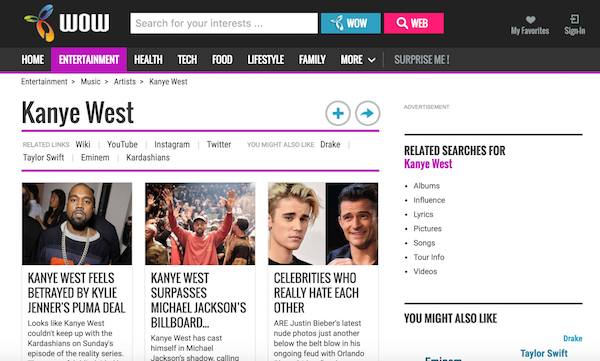

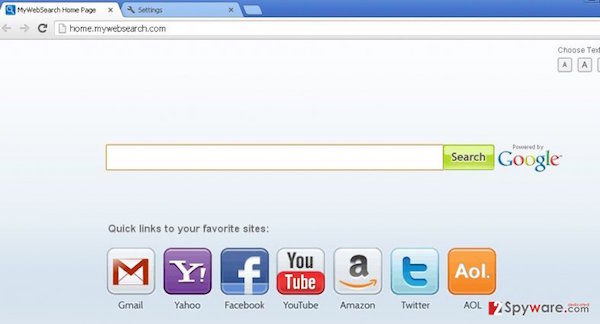
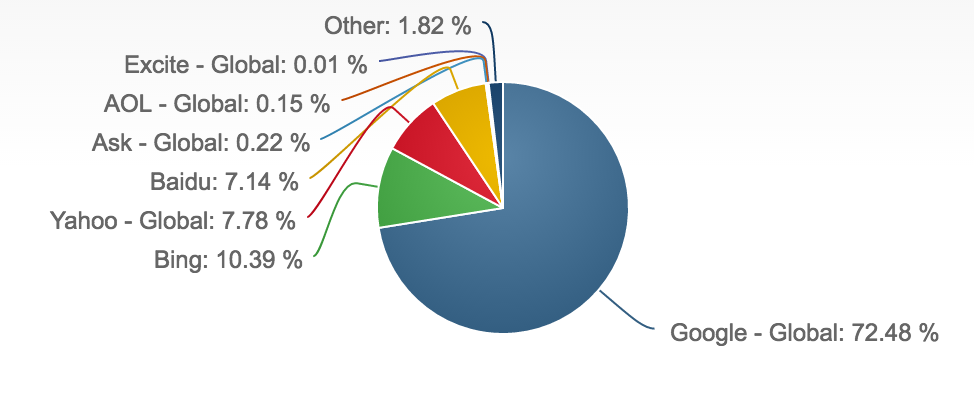






 Image by